Hello! Welcome back to your CCNP Enterprise course.
In our last lesson, you learned how to configure and verify Layer 2 EtherChannels using the LACP and PAgP negotiation protocols. We successfully bundled multiple physical links into a single, logical Port-channel, increasing our network's bandwidth and redundancy.
However, simply creating the bundle is only half the story. A critical question remains: how does a switch distribute traffic across the individual physical links within that bundle? This lesson directly addresses that question and the learning outcome: Configure and verify EtherChannel load-balancing methods.
We will debunk the common misconception that traffic is spread evenly across all links by default. Instead, you'll learn about the deterministic hashing algorithm that governs this process and how you can influence it to optimize your network's performance based on specific traffic patterns.
1. The Reality of EtherChannel Load Balancing
It's tempting to think that once you create a 4Gbps EtherChannel from four 1Gbps links, traffic will just naturally spread out. In reality, a switch uses a per-flow balancing mechanism. This means all packets belonging to a single conversation, or "flow," will traverse the same physical link in the bundle.
This has a significant implication: the throughput for any single flow is limited to the speed of one member link, not the aggregate bandwidth of the entire channel.
Let's see a practical demonstration of this.
EtherChannel - Load Balancing and Misconfiguration Guard
In this video from Kevin Wallace Training, LLC, you'll see a live demonstration of an EtherChannel that, despite having four active links, is only using one for a specific traffic flow. This is a perfect illustration of why understanding load balancing is so important.
Watch from 00:35 to 03:12. Pay close attention to the output of the show interface command, which reveals that only one link has an active input/output rate.
As the video showed, without proper tuning, you might not be getting the performance you expect. To understand how to fix this, we need to look at the mechanism behind the scenes: the hashing algorithm.
2. The Hashing Algorithm Explained
When a switch decides to forward a frame out of a Port-channel interface, it performs a calculation—a hash—on specific fields in the frame's headers. The result of this hash is a number that determines which physical member link will be used.
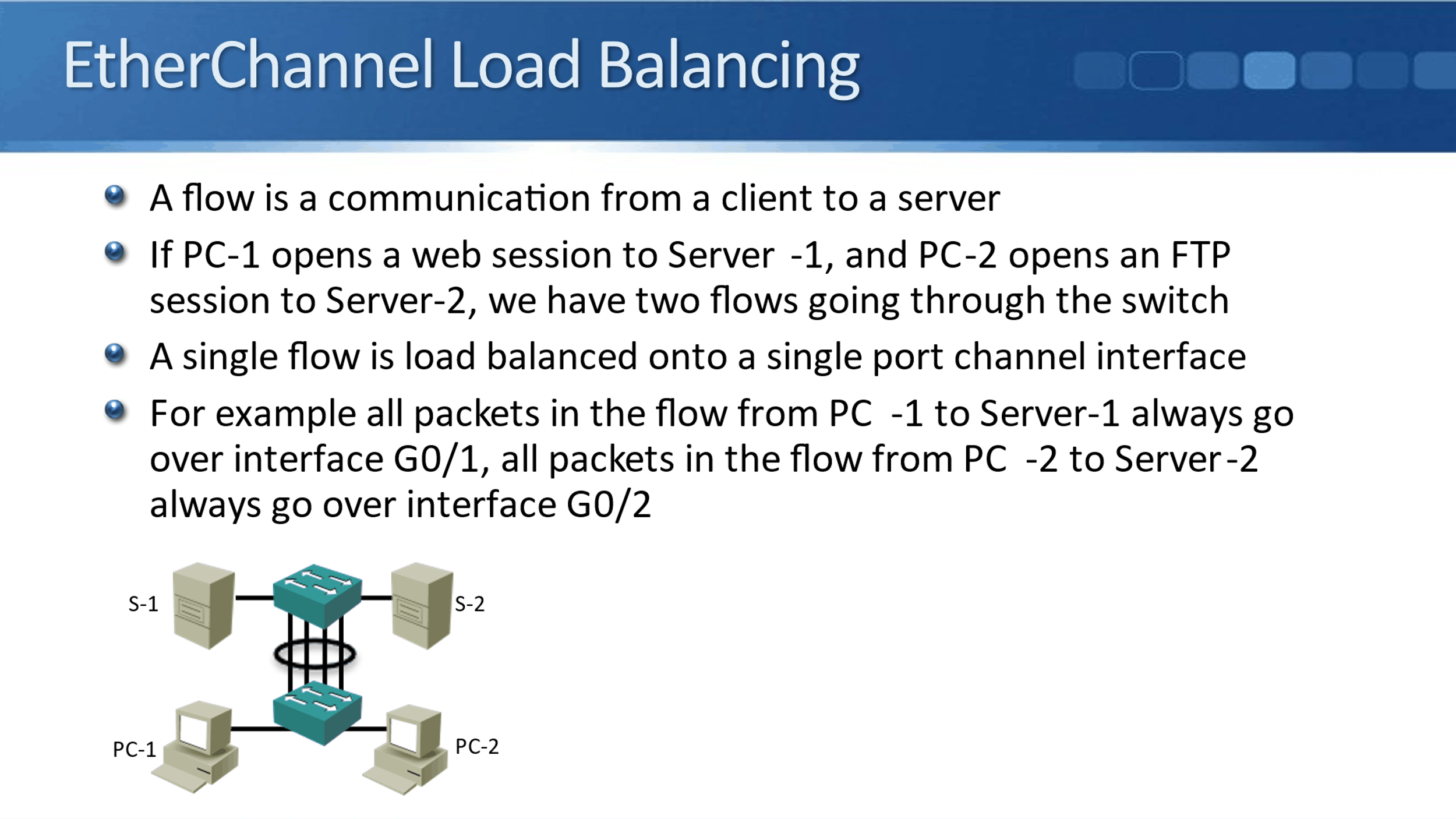
Since the hash is deterministic, frames with the same source and destination characteristics will always produce the same hash value and, therefore, will always travel over the same link. This is why it's called "per-flow" balancing.
Let's dive deeper into how this hash works.
EtherChannel // CCNP ENCOR 350-401 Complete Course
This segment from Jeremy's IT Lab explains the hashing algorithm in more detail, including the concept of mapping hash values to member ports.
Watch from 05:37 to 10:12. Focus on how the algorithm calculates a value and how the number of links in the channel can affect the evenness of the distribution. Note the important comment about how modern switches may use larger hash values, improving distribution even with an 'imperfect' number of links (e.g., 3, 5, 6, or 7).
The key takeaway is that the effectiveness of the load balancing depends entirely on the variety of the input values used in the hash calculation. If all your traffic has the same source MAC address, and you're only hashing on the source MAC, then all traffic will use a single link.
3. Choosing a Load-Balancing Method
Fortunately, you are not stuck with the default hashing parameters. Cisco IOS allows you to globally configure which fields the switch should use in its calculation. These methods operate at different layers of the OSI model.
The goal is to select a method that provides the most randomness, or entropy, for your network's specific traffic patterns.
Comparison of EtherChannel Load Balancing Methods
This article from Network Journey provides an excellent table comparing the most common load-balancing methods. It's a valuable reference for understanding the trade-offs of each option.
Study the table under the 'Comparison of EtherChannel Load Balancing Methods' section. Pay attention to the 'Ideal Scenario' and 'Drawback' for each method.
Here is a summary of that information for quick reference:
| Load Balancing Method | Layer | Hashing Criteria | Ideal Scenario | Drawback |
|---|---|---|---|---|
src-mac |
2 | Source MAC address | Access switch uplinks | Poor distribution if few MACs present |
dst-mac |
2 | Destination MAC address | Campus core; many destinations | One-to-many MAC traffic is unbalanced |
src-dst-mac |
2 | Source & Destination MACs | Better than one-directional methods | Still Layer 2 dependent |
src-ip |
3 | Source IP address | Many clients accessing one server | Doesn’t consider destination diversity |
dst-ip |
3 | Destination IP address | Client accessing many servers | May not distribute well in some cases |
src-dst-ip |
3 | Source & Destination IPs | Most balanced for general routed traffic | Cannot see Layer 4 sessions |
src-dst-port |
4 | Source & Destination TCP/UDP Ports | Most granular; great for web/app servers | Not supported on all platforms |
As a solutions engineer, choosing the right method requires analyzing the network topology and expected traffic flows. For example, if you have many different clients (sources) connecting to a single file server (destination), using src-ip or src-mac would provide good distribution. Conversely, if you use dst-ip in that scenario, all traffic would hash to the same link. src-dst-ip is often a safe and effective choice for general-purpose traffic in a routed network.
4. Configuration and Verification
Configuring the load-balancing method is straightforward, but it's a global command—it affects all EtherChannels on the switch.
Configuration
The command is entered in global configuration mode:
Switch(config)# port-channel load-balance <method>
Where <method> is one of the options like src-mac, src-dst-ip, etc.
You can find a comprehensive list of all available methods, which can vary by platform, in the official Cisco documentation.
Configuring EtherChannels - Cisco
This official Cisco documentation for the Catalyst 9600 series provides a detailed list of the available load-balancing methods. It's good to be aware of the full range of options, including VLAN-based and extended methods.
Skim the table in the section 'Configuring EtherChannel Load-Balancing'. Note the variety of methods, including those that incorporate Layer 4 ports (src-dst-port) and VLAN IDs (vlan-src-dst-ip).
Verification
After configuration, you need to verify that the setting was applied and that it is having the desired effect.
1. Check the configured method:
Use the show etherchannel load-balance command.
Switch# show etherchannel load-balance
EtherChannel Load-Balancing Configuration:
        src-dst-ip

EtherChannel Load-Balancing Addresses Used Per-Protocol:
Non-IP: Source XOR Destination MAC address
  IPv4: Source XOR Destination IP address
  IPv6: Source XOR Destination IP address
2. Observe traffic distribution:
As shown in the first video, you can use show interfaces or show interfaces port-channel <number> and observe the 5 minute input/output rate counters over time. This shows you the real-world effect.
Let's watch how changing the method improves distribution.
EtherChannel - Load Balancing and Misconfiguration Guard
Continuing with Kevin Wallace's demonstration, this segment shows the configuration change in action. He changes the algorithm to source-destination-ip and then generates traffic from multiple sources to verify the improved load distribution.
Watch from 03:12 to 08:10. Observe the configuration process and the 'before and after' effect on the interface counters. This is a perfect example of the configure-and-verify workflow.
3. Test the hashing outcome:
A powerful verification tool that doesn't require generating live traffic is test etherchannel load-balance. You can provide it with source/destination parameters to see which physical interface a hypothetical flow would use.
The syntax is:test etherchannel load-balance interface port-channel <number> {ip | mac} [source_ip | source_mac] [dest_ip | dest_mac]
For example:
Switch# test etherchannel load-balance interface port-channel 1 ip 10.1.1.10 192.168.5.20
Would select Gi0/1 of Po1
This command is invaluable for predicting behavior and troubleshooting uneven load balancing.
Test your understanding!
You manage a data center network where a single web server with IP 172.16.10.100 serves thousands of different clients from across the internet. The server is connected to a switch via a 4-link EtherChannel. You notice that all inbound traffic to the server is congesting a single physical link.
Your show etherchannel load-balance command shows the method is dst-ip.
- Why is the traffic not being balanced correctly?
- Which load-balancing method would you choose to fix this, and why?
Show answer
-
The traffic is unbalanced because the load-balancing method is
dst-ip. Since all traffic is going to the same destination IP address (172.16.10.100), the hashing algorithm always produces the same result, sending all traffic down the same physical link. -
A better method would be
src-iporsrc-dst-ip.src-ip: The clients are coming from many different source IP addresses. Usingsrc-ipfor the hash would create a wide variety of hash inputs, leading to a much more even distribution of traffic across the four links.src-dst-ip: This would also work very well, as the source IP provides the necessary variety for the hash calculation.
Using a Layer 4 method like
src-dst-portcould also be an excellent choice, as clients would use different source ports, adding even more randomness.
Conclusion
You've now moved beyond simply creating an EtherChannel to understanding how to tune its performance. This is a critical skill for any network professional, ensuring that the resources you provision are used efficiently.
Key Takeaways:
- EtherChannel load balancing is per-flow, not per-packet. A single conversation is limited to the bandwidth of a single member link.
- The traffic distribution is determined by a hashing algorithm that can be influenced by a globally configured method.
- The ideal load-balancing method depends on your network's specific traffic patterns. The goal is to choose a method that provides the most variety in the hashed parameters (
src-dst-ipis often a robust choice). - Configuration is done globally with
port-channel load-balance <method>. - Verification involves
show etherchannel load-balanceto check the method,show interfacesto observe real traffic rates, andtest etherchannel load-balanceto predict the path for a specific flow.
Preview of the Next Lesson:
We have now covered how to form an EtherChannel bundle (LACP/PAgP) and how to manage traffic distribution across it (load balancing). The final piece of the puzzle is knowing what to do when things go wrong. In our next lesson, we will focus on how to troubleshoot EtherChannel misconfigurations and inconsistent settings, building on the verification techniques you've learned here.