Hello! Welcome to the final lesson in our "Network Virtualization" module.
In our last session, we took a deep dive into the engine room of the SD-Access fabric, establishing that the overlay is built from a partnership between LISP (the control plane that finds endpoints) and VXLAN (the data plane that transports traffic).
Today, we will zoom out and solidify your understanding of this modern architectural model. The learning outcome for this lesson is to differentiate between the underlay and overlay networks in a software-defined architecture. We will clearly define their roles, compare their characteristics, and understand their critical interdependency. Mastering this distinction is fundamental not just for the ENCOR exam, but for understanding virtually any modern network solution, from SD-Access to SD-WAN and data center fabrics.
The Shift in Network Intelligence
A fundamental shift has occurred in networking, moving intelligence from a monolithic, device-centric core to a flexible, software-defined overlay. This isn't a brand new idea; it mirrors other technological evolutions.
To get a feel for this concept, let's start with a video that uses historical analogies to explain the move toward overlay networking.
Free CCNP 350-401 ENCOR Complete Course: 6.0 Overlay SDN and SD-Access networks
In this video, David Bombal explains the core idea of an overlay network and its evolution, using the shift from the traditional telephone network (PSTN) to Voice over IP (VoIP) as a powerful analogy.
Watch from 0:24 to 2:52 and then from 11:55 to 16:06. As you watch, focus on: The concept of moving intelligence from the core network to the edges. How SD-Access applies the underlay/overlay model to the enterprise campus. The idea of using a simple, routed underlay and building feature-rich VXLAN tunnels on top, all managed by a controller.
As the video explained, the theme is consistent: simplify the underlying transport network and place the complexity and features into a more flexible, abstract layer on top. Let's now formally define these two layers.
Defining the Underlay and Overlay
At the most basic level:
- The Underlay is the physical network.
- The Overlay is the logical network built on top of the physical one.
To extend this, we need to understand the problem this model solves in a modern network. Imagine you need to support multiple departments (e.g., Corporate, IoT, Guest) across a large campus. In a traditional design, this would involve complex VLAN trunking, spanning-tree management, and carefully crafted ACLs on many devices. An overlay approach simplifies this dramatically.
This next video provides a clear, practical walkthrough of the limitations of traditional networks and how the underlay/overlay model addresses them.
What is Underlay Network and Overlay Network?
This video from I-MEDITA provides a very clear definition of the two layers. It explains why you can't simply stretch VLANs across a modern Layer 3 campus and how tunnels are used to create the overlay.
Watch from 4:44 to 7:54 and then from 10:57 to 14:44. Pay close attention to: The definition of the underlay as the physical infrastructure and the overlay as the logical network of tunnels. How encapsulation (using protocols like GRE or VXLAN) allows the overlay traffic to traverse the underlay without the underlay needing to understand its contents. The example of how a new IP header is added to tunnel the original packet, hiding the original source and destination from the underlay routers.
The Underlay Network: The Foundation
As you've seen, the underlay's job is singular and critical: provide robust IP connectivity between the endpoints of the overlay tunnels. In an SD-Access fabric, this means ensuring every Fabric Edge Node can reach every other Fabric Edge and Border Node via its RLOC address.
Key Characteristics of the Underlay:
- Purpose: Transport. It's the highway system.
- Components: Physical routers, switches, and cabling.
- Protocols: A standard Interior Gateway Protocol (IGP) like OSPF or, as recommended for SD-Access, IS-IS. The goal is simply to advertise reachability for the loopback/RLOC addresses of the fabric nodes.
- Design: It is almost always a Layer 3 routed fabric. This eliminates Spanning Tree Protocol (STP), enabling all links to be active and providing scalable, multi-path forwarding using Equal-Cost Multi-Path (ECMP).
The Overlay Network: The Services Layer
The overlay is where all the interesting things happen. It's the virtual network that your users and applications actually live in.
Key Characteristics of the Overlay:
- Purpose: Services. It provides segmentation, policy, mobility, and other advanced features. It's the system of bus routes and shipping lanes that run over the highway.
- Components: Logical tunnels and virtual network constructs created in software on the fabric nodes.
- Protocols: It has two components:
- Control Plane: Manages mappings and policy. Examples: LISP, MP-BGP EVPN, OMP.
- Data Plane: Encapsulates the user traffic. Examples: VXLAN, GRE, IPsec.
- Design: It is completely decoupled from the physical topology. You can create a logical network (e.g.,
IOT_VN) that spans the entire campus without changing a single wire or underlay routing configuration.
Head-to-Head Comparison
To truly master this topic, it's helpful to see the characteristics side-by-side. The following article provides an excellent breakdown.
The article 'Overlay Networks Explained' from NetworkLessons.com gives a detailed description of each layer and concludes with a superb comparison table. This will solidify your understanding of the key differences.
Please read the sections titled 'Underlay Network', 'Overlay Network', and 'Comparison'. Focus on the table at the end, as it neatly summarizes the contrasting features of each layer.
Based on that reading, here is a summary of the core distinctions:
| Feature | Underlay Network | Overlay Network |
|---|---|---|
| Definition | The physical network infrastructure (routers, switches, cables). | A virtual network built on top of the underlay using tunnels. |
| Primary Purpose | Provide simple, reliable IP transport between tunnel endpoints. | Implement services: segmentation, security policies, mobility, etc. |
| Implementation | Hardware-based. | Software-defined. |
| View of the Network | Sees physical paths and next-hops. | Sees logical paths between tunnel endpoints. |
| Protocols | IGPs like OSPF, IS-IS. | Control planes (LISP, BGP) and data planes (VXLAN, IPsec). |
| Complexity | Kept as simple and stable as possible. | Contains all the complexity, features, and policy logic. |
| Scalability | Limited by physical ports and traditional protocol limits. | Massively scalable (e.g., VXLAN supports 16M+ segments). |
| Example in SD-Access | The IS-IS routed fabric connecting the RLOCs of fabric nodes. | The VXLAN tunnels creating Virtual Networks (VNs) between endpoints. |
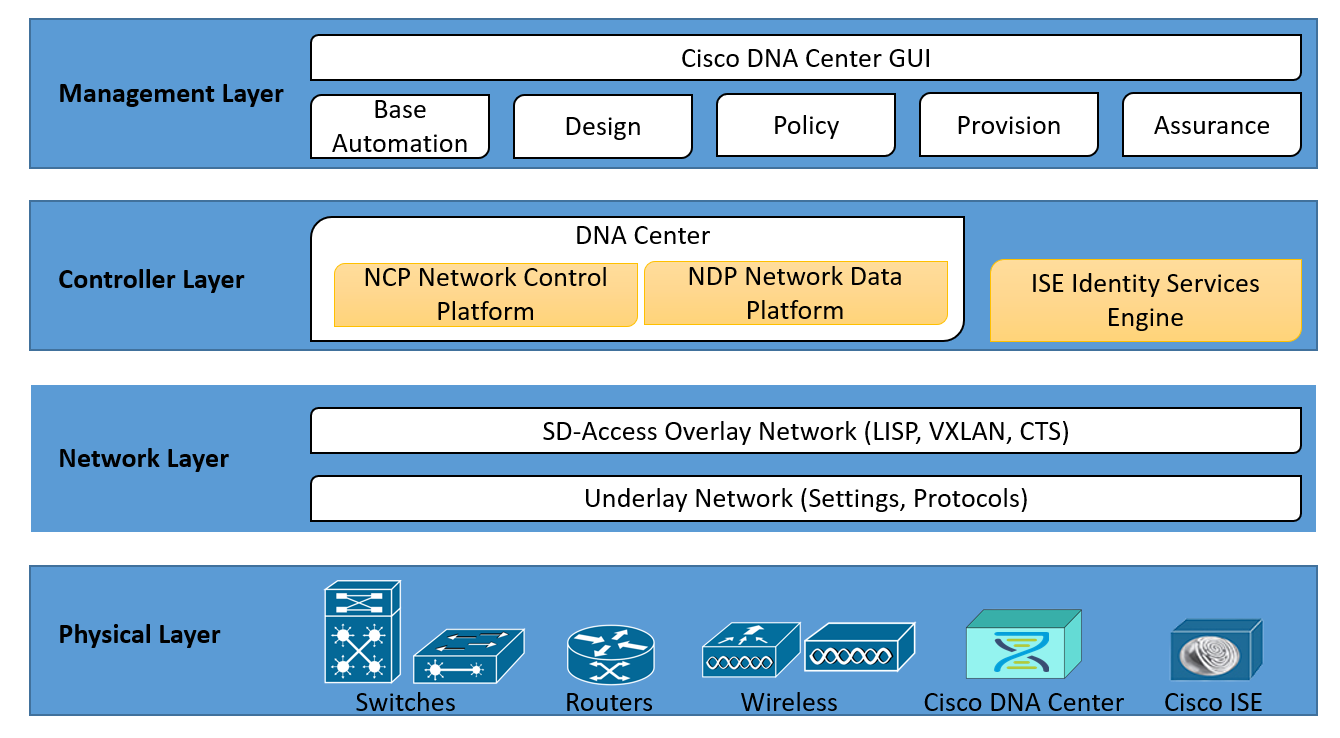
Visualizing the Layers in SD-Access
Let's look at how this appears in a Cisco SD-Access architecture diagram.

The Critical Interdependency
The overlay is completely dependent on a healthy underlay. If the underlay has problems—packet loss, high latency, or flapping routes—the overlay tunnels will be unstable and performance will suffer. This is a crucial point for troubleshooting.
Overlay Technologies for CCNP Enterprise
This brief excerpt from an article on NetworkJourney explains the relationship and dependency of the overlay on a stable underlay.
Read question and answer #4, titled 'How do overlays affect underlay routing?'. This directly addresses the dependency between the two layers.
This dependency has a major implication for troubleshooting: you must be able to diagnose issues at both layers. A ping or traceroute from a user's machine (in the overlay) will only show you the logical tunnel endpoint; it won't show you the physical path the packet takes through the underlay. To troubleshoot a problem, you often have to test connectivity in the overlay and separately test connectivity between the tunnel endpoints (RLOCs) in the underlay.
Test your understanding!
An engineer is troubleshooting an issue in an SD-WAN environment where a branch office intermittently loses connectivity to the data center. The SD-WAN uses IPsec tunnels (the overlay) running over a public internet connection (the underlay).
The engineer finds that a ping from the branch vEdge router to the data center vEdge router's public IP address is showing high latency and packet loss. However, the overlay tunnel status appears to be "up".
Based on this information, is the problem more likely in the underlay or the overlay? Why?
Show answer
The problem is almost certainly in the underlay. The fact that pings between the public IP addresses of the vEdge routers (the tunnel endpoints) are experiencing packet loss and high latency points to a problem with the physical transport—the public internet connection.
Even though the overlay tunnel is "up," its performance is suffering because its foundation, the underlay, is unstable. The engineer should focus on troubleshooting the internet circuit, not the IPsec or OMP configuration.
Conclusion
You have now reached the end of the "Network Virtualization" module. In this lesson, we have formally differentiated the two fundamental components of any software-defined network.
Key Takeaways:
- The Underlay is the physical transport network. Its only job is to provide reliable IP reachability. It is simple, stable, and hardware-based.
- The Overlay is the logical services network. It is where features like segmentation and policy are implemented. It is flexible, complex, and software-defined.
- The overlay is entirely dependent on the health of the underlay. Troubleshooting requires visibility into both layers.
- This architectural separation (Transport vs. Services) is the core principle that enables the scalability, agility, and programmability of modern networks like SD-Access and SD-WAN.
Preview of the Next Module:
This lesson serves as a perfect bridge to our next module, Network Automation and Programmability. The very reason for creating this powerful, abstracted overlay is so that we can program it. Instead of manually configuring hundreds of devices, we use controllers like Cisco DNA Center to define our intent ("The IoT_VN cannot talk to the Corp_VN"), and the controller automatically programs the overlay to make it happen. In the next lesson, we will begin by comparing this new controller-based approach with traditional network management.