Welcome to your first lesson! We're kicking off your journey to building AI products by getting hands-on with the fundamental building block: the Large Language Model (LLM). Before you can build with a tool, you need to understand how it behaves. This course is designed to be highly practical, so we'll skip the heavy theory and jump right into experimenting.
Today, your goal is to send your first instruction—called a "prompt"—to an LLM and see exactly how it constructs a response. You'll learn what "tokens" are and watch a model generate text piece by piece. This foundational understanding is crucial for everything that comes next, from writing effective prompts to building complex AI applications.
The Building Blocks: Prompts and Tokens
At its core, a Large Language Model is a sophisticated text-prediction engine. When you give it a prompt, it doesn't "understand" it in a human sense. Instead, it calculates the most probable sequence of text to follow. It does this by generating one small piece at a time.
These small pieces are called tokens. A token can be a whole word, like "event", or just a part of a word, like "pla" and "nning". The model breaks your input prompt into tokens and then generates the output, one token at a time.

Understanding this token-by-token generation is key. It helps explain why models sometimes make strange mistakes and is the basis for features like streaming, which you see in tools like ChatGPT.
Activity 1: Seeing Generation in Action
To make this concept tangible, you'll use a visual tool that shows an LLM's inner workings as it generates text. This will let you see the token-by-token process live.
LLM Transformer Model Visually Explained
This interactive webpage provides a simplified, visual representation of a Transformer model (the architecture behind models like GPT). It's the perfect environment to directly observe token-by-token generation without any other distractions.
Open the "Transformer Explainer" tool. In the text box at the top, type a simple prompt. Try something related to your interests, like: To become a successful DJ, you need Click the Generate button. Observe closely: You will see the model add one token at a time to complete the sentence. The new tokens will appear highlighted as they are generated. Try one more prompt related to your event business, such as: The three most important elements of a great party are Click Generate again and watch the process unfold. Focus on how the response is built incrementally, not all at once.
This exercise makes the abstract idea of token-by-token generation concrete. You're literally watching the model "think" by stringing tokens together.
Activity 2: Using a Professional Playground
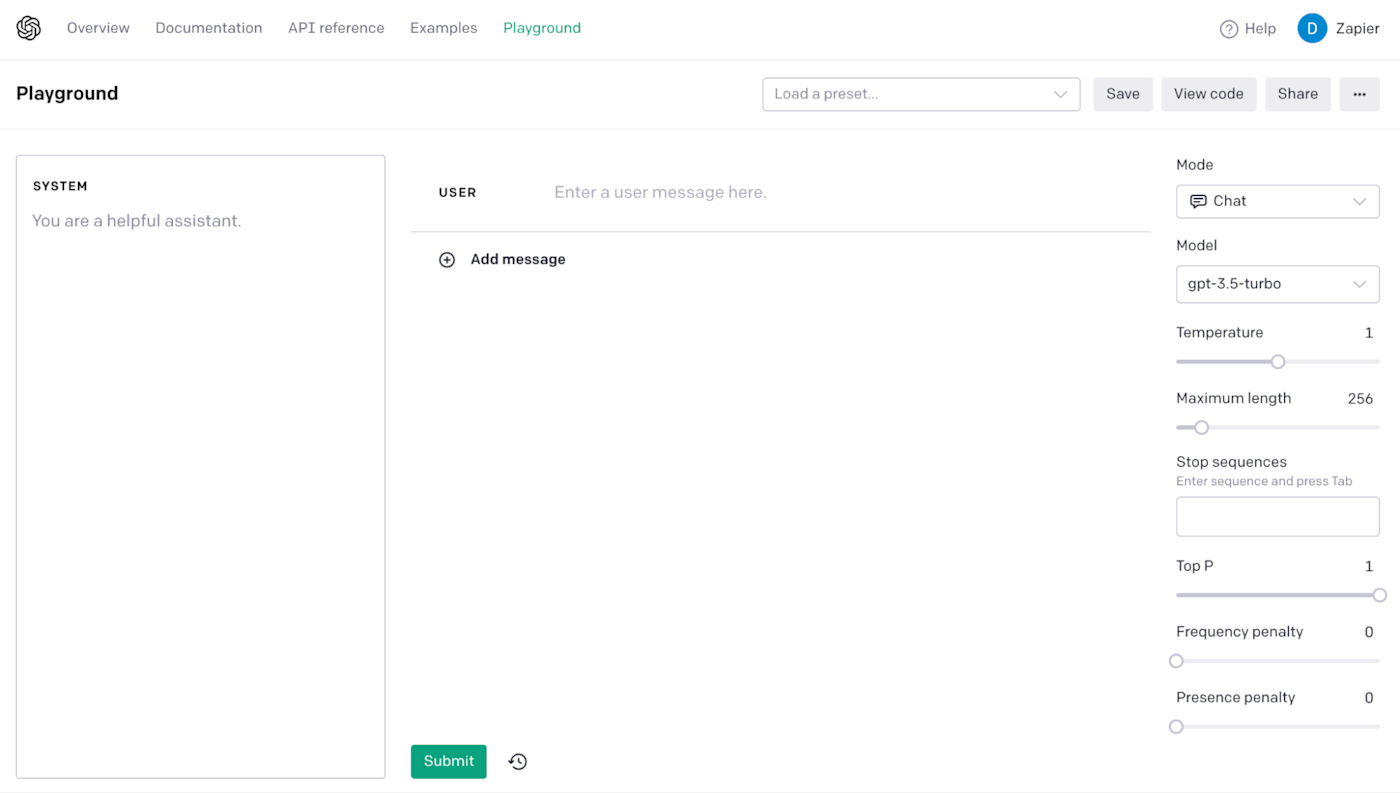
The visualizer is great for learning, but in professional workflows, you'll use a "playground." A playground is a web interface provided by an AI company (like OpenAI or Anthropic) that gives you full control over the model's settings. It’s where you'll test and refine prompts before writing any code.
Let's explore the OpenAI Playground, which is an industry-standard tool.
To get a quick and clear overview, you'll read a short article that walks through the key concepts.
How to use the OpenAI Playground - NatashaTheRobot
This article by NatashaTheRobot provides a clear, practical guide to the OpenAI Playground. It explains why playgrounds are important for testing and breaks down the different modes of interaction.
Please read the following sections: Start from the beginning of the article to understand why playgrounds are a crucial first step. Read the section titled "The Different Playgrounds", paying special attention to the explanation of the "Complete" playground. Although it's a legacy tool, its ability to show token probabilities is a great illustration of the concepts we're discussing. Finally, read the section on the "Chat" playground. This is the modern and most common interface you will be using.
Now, let's put that reading into practice.
Your Task:
- Navigate to the OpenAI Playground. You'll need to create a free developer account if you don't have one. OpenAI gives new accounts some free credits, which are more than enough for the exercises in this course.
- You will land in the Chat mode.
- In the SYSTEM box on the left, you can leave the default text:
You are a helpful assistant. - In the USER box below it, type a prompt. Let's use one relevant to your business:
I need to create a checklist for planning a corporate launch event. What are the 10 most important items to include? - Click the Submit button at the bottom.
- Observe the response as it appears in the right-hand column. You'll see the text streaming in, which is the user-friendly version of the token-by-token generation you saw in the first activity.
Feel free to try another prompt or two. The goal here is simply to get comfortable with the basic workflow of sending a prompt and receiving a response in a standard development tool.
Conclusion
In this lesson, you took your first step into the practical world of LLMs. You've moved from theory to hands-on experimentation, which will be the core of our approach throughout this course.
Key Takeaways:
- LLMs work by predicting and generating text token by token.
- A token is the basic unit of text for a model, which can be a word or part of a word.
- Playgrounds are essential sandboxes for testing prompts and understanding model behavior before writing any code.
- You can observe an LLM's generation process directly through visualizers or indirectly through the streaming output in chat interfaces.
In the next lesson, we'll build on this foundation. You'll compare how different LLMs from different companies respond to the exact same prompt. This will reveal how a model's training and design choices shape its "personality" and capabilities.