Welcome back! In our last lesson, you learned the complete workflow for taking an unnormalized table and decomposing it into a set of clean, efficient tables in Third Normal Form (3NF). We ended by listing the final tables from our exercise, noting their primary and foreign keys.
Today, we're going to focus squarely on that crucial last part: the keys. The normalization process isn't just about splitting data apart; it's about carefully establishing the links that allow us to put it back together. This lesson will show you exactly how and why primary and foreign keys are identified and placed during normalization to maintain the relationships within your data. Understanding this is the key to turning a collection of normalized tables into a functional, relational database.
1. The Role of Keys: The Glue of a Relational Database
After normalization, you have multiple tables, each focused on a single entity (like Customers, Products, or Orders). On their own, they are just isolated lists of data. Foreign keys (FKs) are the essential "glue" that connects these tables, preserving the original business relationships.
A foreign key is an attribute (or a collection of attributes) in one table that refers to the primary key of another table.
The following short video provides a concise definition of a foreign key in the context of normalization.
Database Normalization 1NF 2NF 3NF
This clip from the video "Database Normalization 1NF 2NF 3NF" by Jesper Lowgren defines what a foreign key is and how it links tables.
Please watch the section from this clip. The key takeaway is the simple but powerful idea that when a primary key from one table is used to link to another table, it's called a foreign key in that second table.
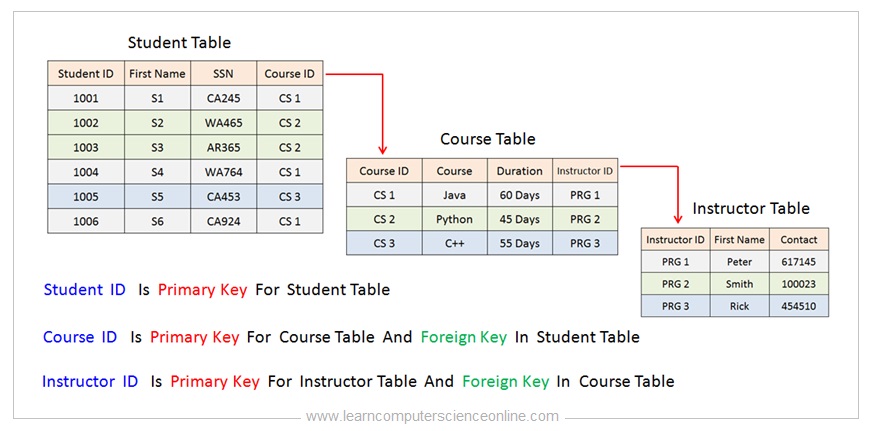
The image below illustrates this concept perfectly. We have three separate tables: Student, Course, and Instructor. Notice how the primary keys (Student ID, Course ID, Instructor ID) are used as foreign keys in other tables to create meaningful links.
2. How Normalization Creates and Places Keys
Foreign keys don't appear by magic; they are a direct and necessary byproduct of the normalization process itself. The fundamental rule is:
When you decompose a table to resolve a dependency, the determinant attribute (the left-hand side of the functional dependency) becomes the primary key of the new table. A copy of that key is kept in the original table as a foreign key.
Let's see how this works in practice for 2NF and 3NF.
From 1NF to 2NF: Resolving Partial Dependencies
This step applies when you have a composite primary key. When you move an attribute that only depends on part of the PK to a new table, that part of the PK becomes the primary key of the new table and also the foreign key link.
From 2NF to 3NF: Resolving Transitive Dependencies
When you have a transitive dependency (e.g., A → B → C, where A is the PK), you move the transitively dependent attribute C into a new table with its determinant B. In this new table, B is the primary key. You leave B in the original table, where it now serves as a foreign key pointing to the new table.
The following video provides an excellent practical demonstration of this entire process.
Database Normalization for Beginners | How to Normalize Data w/ Power Query (full tutorial!)
In this video, "Database Normalization for Beginners" by Maven Analytics, the presenter normalizes a large transaction file.
Focus on these two key segments: Creating Dimension Tables (watch this part): Observe how separate tables are created for Customers, Stores, and Products. In each case, a unique primary key is established (Customer ID, Store ID, Product ID). Cleaning the Fact Table and Linking (watch this part): This is the crucial step. See how the original transaction table is stripped of all redundant columns, leaving only the keys from the new dimension tables. These keys (Customer ID, Store ID, Product ID) now function as foreign keys, allowing the central transaction table to be linked to the detailed dimension tables. The video concludes by visually creating these relationships.
3. A Detailed Walkthrough with Examples
Let's solidify this with some detailed, text-based examples. The following resource contains excellent practice questions that break down the process of identifying PKs and FKs during normalization.
NORMALIZATION NOTE & EXERCISES (Up to 3NF)
This document provides worked solutions for normalization problems. The diagrams in the answers clearly label the primary and foreign keys created during the process.
Please review the answers to Question 9 and Question 10. For Question 9 (Normalizing to 2NF): Start by looking at the initial TempStaffAllocation table with its composite primary key (staffNo, branchNo). In the answer, observe how partial dependencies (branchAddress depends only on branchNo; name and position depend only on staffNo) are resolved. Notice that when the Branch and TempStaff tables are created, branchNo and staffNo become their respective primary keys. These same keys remain in the final TempStaffAllocation table, where they act as foreign keys. For Question 10 (Normalizing to 3NF): Look at the BranchManager table. The answer identifies a transitive dependency: branchNo → mgrStaffNo → name. See how this is resolved by creating a new ManagerStaff table. mgrStaffNo becomes the primary key of this new table. Crucially, a copy of mgrStaffNo is left in the original table (now called Branch), where it serves as the foreign key linking a branch to its manager.
This step-by-step decomposition, with explicit labeling of primary and foreign keys, is the core skill for this lesson.
The image below shows another complete example, starting from one unnormalized table and ending with several linked 3NF tables. Trace the Supplier attribute to see how it becomes the primary key of the Supplier table and a foreign key in the Item table.

4. Revisiting Our Practice Exercise
Let's apply this thinking to the exercise from our last lesson. We started with ORDER_DATA and ended up with five 3NF tables. The solution listed the PKs and FKs. Now, let's justify why those foreign keys exist.
Final 3NF Tables:
- CUSTOMER(
CustID,CustName,CustEmail) - PK:CustID - CATEGORY(
ProdCategory,CatDescription) - PK:ProdCategory - PRODUCTS(
ProdID,ProdName,ProdCategory,UnitPrice) - PK:ProdID, FK:ProdCategory - ORDERS(
OrderID,OrderDate,CustID) - PK:OrderID, FK:CustID - ORDER_LINE(
OrderID,ProdID,Quantity) - PK: (OrderID,ProdID), FKs:OrderID,ProdID
Your Task:
For each foreign key identified above, explain which normalization step (resolving a partial or a transitive dependency) caused it to be placed there.
Click to reveal the solution
-
ORDERS.CustIDis a Foreign Key:- This FK was created while resolving a transitive dependency to get to 3NF.
- The dependency was
OrderID→CustID→ (CustName,CustEmail). - We created the
CUSTOMERtable withCustIDas its PK.CustIDwas left in theORDERStable to link an order to the customer who placed it.
-
PRODUCTS.ProdCategoryis a Foreign Key:- This FK was also created while resolving a transitive dependency to get to 3NF.
- The dependency was
ProdID→ProdCategory→CatDescription. - We created the
CATEGORYtable withProdCategoryas its PK.ProdCategorywas left in thePRODUCTStable to link a product to its category description.
-
ORDER_LINE.OrderIDandORDER_LINE.ProdIDare Foreign Keys:- These FKs were established while resolving partial dependencies to get to 2NF.
- The original 1NF table had a composite key (
OrderID,ProdID). - Attributes like
OrderDateandCustIDdepended only onOrderID, so they were moved to theORDERStable.OrderIDwas left inORDER_LINEto link back to the main order details. - Attributes like
ProdNameandUnitPricedepended only onProdID, so they were moved to thePRODUCTStable.ProdIDwas left inORDER_LINEto link back to the specific product details.
Conclusion
In this lesson, you've learned that foreign keys are not an afterthought but a fundamental part of the normalization process. They are the essential links that preserve data relationships when tables are decomposed to eliminate redundancy.
Key Takeaways:
- A foreign key in one table is a primary key in another, creating a relational link.
- When you split a table to resolve a dependency (either partial or transitive), the determinant becomes the PK of the new table.
- A copy of that determinant is retained in the original table, where it serves as the foreign key, ensuring the relationship is maintained.
- The final result of normalization is a web of tables connected by these carefully placed primary and foreign key pairs.
Now that you can create a set of 3NF tables and correctly identify the keys that link them, you have a solid foundation in database design. In our next lesson, we will practice working in the opposite direction. You'll be given a set of existing tables and learn how to analyze them to determine their level of normalization (1NF, 2NF, or 3NF), a critical skill for evaluating and improving real-world databases.