Hello! In our last lesson, we established a clear understanding of why modern applications rely on database management systems by comparing them to the older, more problematic file-based systems. We saw that a DBMS provides solutions for data redundancy, security, integrity, and access.
Now, we'll shift our focus from the "why" to the "how." This lesson introduces the relational data model, which is the architectural foundation for the vast majority of databases in use today, including MySQL, SQL Server, and Oracle. You'll learn how this model organizes data into a simple, powerful, and intuitive structure. By the end of this lesson, you will be able to describe how data is organized into tables (relations), rows (tuples), and columns (attributes), which is the fundamental language of database design.
1. The Relational Model: A Structured Approach
The relational data model, proposed by E. F. Codd in 1970, was a revolutionary idea that replaced complex, hierarchical data structures with a simple, logical concept: organizing all data into tables.
You can think of a relational database as a collection of tables, similar to spreadsheets. However, unlike separate spreadsheets, these tables are formally defined and can be linked to one another based on the data they hold. This structure is what allows for the powerful data retrieval and integrity features we discussed in the previous lesson.
Let's begin by defining the core components of this model. The following video provides an excellent introduction to the fundamental terminology.
Introduction to Relational Data Model
Watch this segment from Neso Academy's "Introduction to Relational Data Model" to get acquainted with the foundational terms.
Focus on the section that explains the core terminologies. The presenter clearly defines 'relation,' 'tuple,' and 'attribute' using a simple 'student' table as an example.
2. The Building Blocks: Relations, Attributes, and Tuples
As the video explained, the relational model uses specific terminology, some of which has more common synonyms. Getting comfortable with these terms is essential.
-
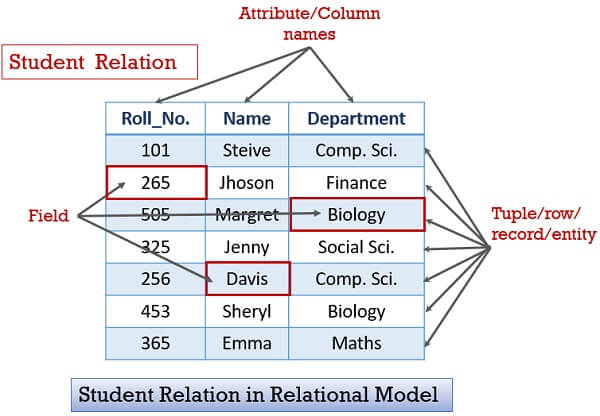
Relation (or Table): This is the primary structure used to organize data. A relation is a two-dimensional table consisting of columns and rows. For example, in a university database, you might have separate relations for
STUDENTS,COURSES, andINSTRUCTORS. -
Attribute (or Column / Field): This represents a property or characteristic of the items the table is describing. Each column has a distinct name. In a
STUDENTSrelation, the attributes might beStudentID,FirstName,LastName, andMajor. -
Tuple (or Row / Record): This represents a single instance or entry in the table. Each row is a collection of related data values corresponding to the attributes. For example, a single row in the
STUDENTStable would contain all the information for one specific student.
The following image provides a clear visual breakdown of these components. Notice how the formal terms (Relation, Attribute, Tuple) map directly to the more common terms (Table, Column, Row).
3. Key Characteristics of a Relation
Beyond its basic structure, a relation in the relational model has several important characteristics. The video you watched earlier introduces a few more key terms. Let's explore them in more detail.
Introduction to Relational Data Model
Return to the Neso Academy video to learn about the properties that define a relation's structure and constraints.
This time, watch the section covering Domain, Schema, Degree, and Cardinality. Pay close attention to how 'domain' limits the values an attribute can hold.
Let's summarize and expand on these concepts.
-
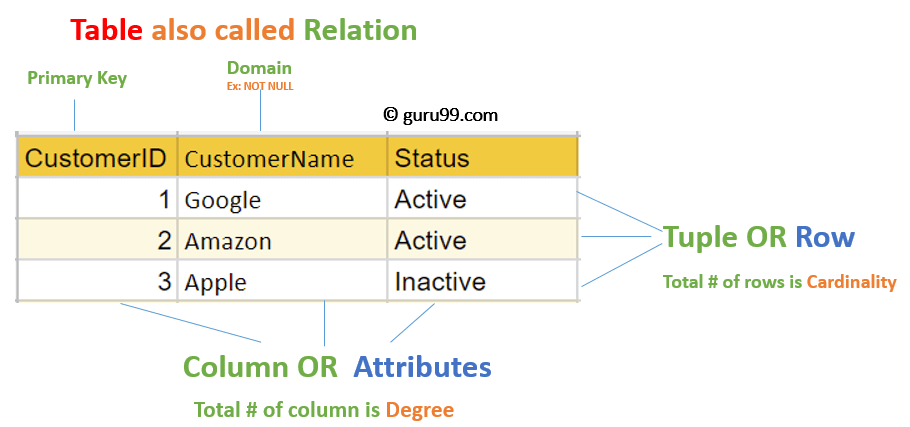
Domain: A domain is the set of all permissible values for an attribute. It essentially defines a rule for what data is allowed in a column. For example:
- The domain for a
Gradeattribute might be the set of characters {'A', 'B', 'C', 'D', 'F'}. - The domain for an
Ageattribute might be positive integers between 16 and 100.
This is a powerful concept for enforcing data integrity, a key advantage of the DBMS approach.
- The domain for a
-
Degree: The degree of a relation is the number of attributes (columns) it contains.
-
Cardinality: The cardinality of a relation is the number of tuples (rows) it contains at a specific point in time.
This next image labels these properties on a sample CUSTOMER relation. It also points to the 'CustomerID' attribute as the 'Primary Key'. We'll dedicate a full lesson to keys soon, but for now, just think of it as a unique identifier for each row.
Finally, for a table to be a true mathematical relation, it must follow some strict rules. The following reading outlines these fundamental properties.
The Relational Data Model – Properties of a Table
This section from the "Database Design" textbook by Adrienne Watt lists the formal properties that every table in a relational database must adhere to.
Read the short section titled "Properties of a Table." Focus on understanding rules like "no duplicate rows" and "entries in columns are atomic."
Here's a summary of those essential properties:
- Each row (tuple) is unique. No two rows can be identical.
- Entries in each column must be atomic, meaning they are indivisible. For example, a
PhoneNumberattribute should not contain two different phone numbers in the same field for a single row. This rule is crucial and will be the basis for our work on normalization later in the course. - The order of rows and columns is not significant.
4. Quick Exercise
Let's apply these concepts. Consider the following COURSE relation:
| CourseID | CourseName | Department | Credits |
|---|---|---|---|
| CS101 | Intro to Computer Science | CS | 4 |
| MA250 | Calculus II | Math | 3 |
| PH201 | General Physics | Physics | 4 |
Based on this table, answer the following questions:
- What is the name of the relation?
- List the attributes of this relation.
- How many tuples are shown?
- What is the degree of this relation?
- What is the cardinality of this relation?
Click to see the answers
- Relation Name:
COURSE - Attributes:
CourseID,CourseName,Department,Credits - Number of Tuples: 3
- Degree: 4 (because there are four columns)
- Cardinality: 3 (because there are three rows)
Conclusion
In this lesson, we moved from the "why" of databases to the "how," establishing the foundational concepts of the relational model. You now have the vocabulary and conceptual framework to understand how data is structured in the most common type of database.
Here are the key takeaways:
- The relational model organizes data into a collection of tables, formally known as relations.
- Each relation is composed of attributes (columns) that define its structure and tuples (rows) that represent individual records.
- Every attribute has a domain, which specifies the set of valid values it can hold.
- The degree of a relation is its column count, and its cardinality is its row count.
- Relations must adhere to specific rules, such as having unique rows and atomic values in each field.
Now that we understand the structure data is stored in (a relation), our next step is to determine what these relations should represent. In the next lesson, we will learn how to identify entities from a real-world scenario. These entities will eventually become the relations (tables) in our database design.