Welcome to your first lesson! We're kicking off your journey into social media graphic design by building a solid foundation. Your goal is to create professional-looking content, and a huge part of that is making sure your designs look perfect on every platform. A beautiful design can be ruined by incorrect sizing, leading to awkward cropping or blurry images.
In this lesson, we'll tackle the first essential step before you even start designing: understanding the technical requirements of social media graphics. We will focus on identifying the standard dimensions and file formats for the major platforms you'll be working with—Instagram, Facebook, LinkedIn, and X. By the end of our session, you'll know exactly what size your canvas should be and what file type to save it as, ensuring your work always looks its best.
Pixels, Dimensions, and Aspect Ratios
Before we dive into the specific numbers for each platform, let's clarify three key terms you'll encounter constantly in digital design: pixels, dimensions, and aspect ratio.
- Pixels (px): Think of a digital image as a mosaic made of tiny squares of color. Each square is a pixel. The more pixels you have in an image of a certain size, the sharper and more detailed it will appear. That's why "high-resolution" images look so crisp.
- Dimensions: This is the literal size of your image, measured in pixels. It's always expressed as width x height (e.g., 1080 x 1080 pixels). This tells you the exact number of pixels along the horizontal and vertical sides of your image.
- Aspect Ratio: This describes the proportional relationship between the width and height of an image. For example, a 1080 x 1080 pixel image has a 1:1 aspect ratio because its width and height are equal, making it a perfect square. A 1920 x 1080 pixel image has a 16:9 aspect ratio, which is the standard for widescreen videos.
Understanding these terms is crucial because social media platforms are built for specific shapes. To learn more about these basics, please read the following short section from Buffer's guide on social media image sizes.
Social Media Image Sizes in 2026: Guide for 9 Major Networks - Buffer
This section provides clear, simple definitions for aspect ratio and pixels, and explains the current trend towards vertical images.
In the article, find the section titled "Social media image size basics." Please read from the start of the section down to the end of the paragraph on file formats. Pay close attention to the explanation of the trend toward vertical aspect ratios—this is key to creating eye-catching content.
As the reading highlights, vertical formats like 4:5 and 9:16 are becoming dominant because they take up more of a user's screen as they scroll on their phone. More screen real estate means your post is more likely to grab and hold their attention.
Watch the first minute and a half of the following video. The creator does an excellent job of visually demonstrating how a taller post (a different aspect ratio) commands more space and attention on the Instagram feed compared to a traditional square post.
Instagram just changed its post size for 2025 (The new 3:4 ratio!)
This video explains the strategic advantage of using taller image formats on Instagram.
Please watch from the beginning until the visual comparison of the square, 4:5, and the newer 3:4 ratio posts. Notice how each successive format fills more of the screen.
Standard Dimensions for Social Media
Now that you understand why dimensions and aspect ratios matter, let's look at the specific numbers. Each social media platform has its own set of recommended sizes for different types of content (profile pictures, posts, stories, etc.). While you don't need to memorize every single one, it's good to be familiar with the most common ones.
This image from Hootsuite provides a fantastic at-a-glance overview of the key dimensions for major platforms.
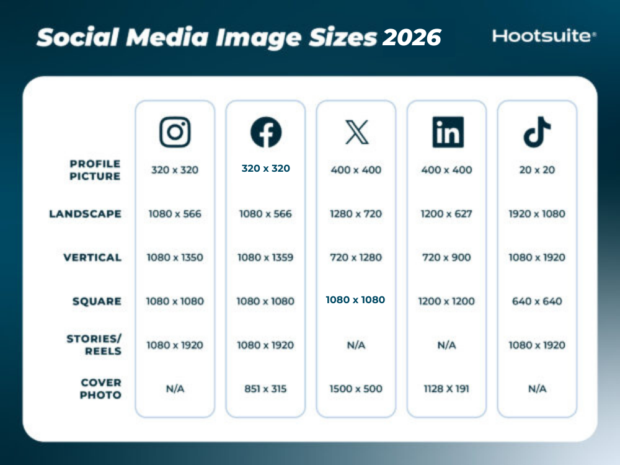
As you can see, while there are differences, some sizes are quite common. For example, 1080 x 1080 px (a 1:1 square) is a versatile size that works well on Instagram, Facebook, and LinkedIn feeds. For vertical content like Stories or Reels, 1080 x 1920 px (a 9:16 aspect ratio) is the universal standard.
For a more detailed breakdown, we'll turn back to the Buffer guide. It provides comprehensive tables for each platform. We'll use these as our primary reference.
Social Media Image Sizes in 2026: Guide for 9 Major Networks - Buffer
This resource contains detailed, up-to-date dimensions for all the content types on the platforms we're studying. Having this as a reference is invaluable.
First, take a look at the main summary table for a quick comparison. Then, feel free to skim the detailed sections for Facebook, Instagram, X/Twitter, and LinkedIn. You don't need to memorize these numbers. The goal is to understand the different types of images (profile, cover, post) and know where to find the correct dimensions when you need them.
Choosing the Right File Format: JPG vs. PNG
Once your design is complete, you need to save it in the right file format. For social media, your main choices will almost always be JPG or PNG. Choosing the correct one is important for both image quality and file size.
-
JPG (or JPEG): This is the best format for photographs. It uses a compression method that is great at handling the complex colors and tones of a photo, resulting in a smaller file size. However, this compression is "lossy," meaning some data is permanently lost, which can cause blurriness if the image is compressed too much. JPGs do not support transparent backgrounds.
-
PNG: This format is ideal for graphics that include text, logos, icons, and solid blocks of color. It uses "lossless" compression, which means it preserves all the original data, keeping lines and text sharp and crisp. Critically, PNGs also support transparent backgrounds, which is essential if you want to place a logo onto another image without a white box around it.
This flowchart provides a simple decision-making process for choosing a file format.

For social media, you will almost always be working in the "Digital" branch of this flowchart. As you can see, it guides you to JPEG for photos and PNG for graphics, especially those needing transparent backgrounds.
Putting It All Together in Canva
This knowledge of dimensions and file formats becomes immediately practical when you start a project in Canva. You'll use this information at the very beginning and very end of your design process.
Watch these two short clips from a Canva tutorial. The first shows you how to set your project dimensions, either by selecting a pre-made template (like "Instagram Post") or by entering custom dimensions. The second clip shows the download screen, where you'll select your file format (like PNG or JPG).
Canva Tutorial For Beginners: A Free Masterclass 2026 (Complete Course)
This video demonstrates exactly where and how the concepts of dimensions and file formats are applied within the Canva interface.
First, watch the section on creating a new design from the beginning. Notice how Canva has presets for common social media sizes, but you can also input custom dimensions—this is where your knowledge from today comes in. Then, skip ahead and watch the part about downloading your design, specifically from this timestamp and then the section explaining PNG options from here. This shows you where you'll choose between JPG and PNG and highlights the crucial "transparent background" option for PNG files.
Conclusion
Congratulations on completing your first lesson! You've built the technical foundation that underpins all great social media design.
Here are the key takeaways:
- Dimensions and Aspect Ratios are Key: Using the correct size for each platform prevents ugly cropping and ensures your designs look professional and maximize screen space.
- Know Your Go-To Sizes: While there are many sizes, a 1080 x 1080 px square and a 1080 x 1920 px vertical rectangle will cover a vast majority of your post and story needs.
- Choose the Right File Format: A simple rule of thumb is JPG for photos and PNG for graphics (especially those with text or needing a transparent background).
- This is Step One: You always define your canvas size before you start designing and choose your file format when you export.
In our next lesson, we'll move from the canvas to the paint. We will explore the fundamentals of color theory, learning how to choose and combine colors to create a specific mood and make your designs visually appealing.