Hello! Welcome to the final lesson in our module on crafting your video essay.
In our last session, you did some excellent work reading your script aloud to optimize its rhythm and flow. By marking up your text with pauses and points of emphasis, you transformed it from a piece of writing into a score for a vocal performance.
Today, we'll build directly on that foundation. Our goal is to add parenthetical notes for visual ideas or tonal delivery cues. This is the crucial step where your script evolves from just a transcript of what you'll say into a complete blueprint for your final video. For a creator like exurb1a, whose work you admire, the magic lies in the seamless fusion of narration, visuals, and timing. This lesson is about how you, as the writer, can plan for that magic from the very beginning.
1. The Script as a Blueprint
So far, you've acted as the writer and, in the last lesson, the vocal director. Now, you must also put on the hat of the video editor. A video essay script isn't just text; it's a technical document that coordinates audio and visual elements.
Think of it like this: the dialogue is the core logic of your program, but it needs comments and instructions to tell the computer (or in this case, you as the editor and narrator) how to execute the code and what assets to display. These instructions are called parenthetical notes.
This practice is standard across all forms of screenwriting. Take a look at this example from a film script.

Our task today is to embed these two types of notes—tonal and visual—into your script, creating a comprehensive plan for production.
2. Formalizing Your Tone
In the last lesson, you made margin notes and underlines to guide your delivery. Now, we'll formalize those instructions and place them directly within the script. These are your tonal cues. They are usually short, lowercase, and enclosed in parentheses ().
To see how professional creators use these, let's look at some advice on scriptwriting.
How to Start YouTube Script Writing the Right Way
The article 'How to Start YouTube Script Writing the Right Way' offers a practical fix for a common problem: a monotonous delivery. It shows how simple cues can bake energy and pacing directly into the script.
Please read the final point in the article, 'Common Mistakes to Avoid'. Specifically, focus on the mistake 'Same tone from start to finish' and its corresponding 'Fix'. Notice the examples of 'intentional energy cues' it suggests.
As the article highlights, simple notes like (lean in), (smile here), (slow down), or (pause) can make a world of difference. They serve as direct instructions to your future self during recording.
Let's refine an example. In the last lesson, you might have underlined a word for emphasis:
Original: The philosophical implications are staggering.
Now, you can make that instruction more explicit and nuanced:
With Tonal Cue: The philosophical implications are... (pause for effect) ...staggering.
Or, to capture a specific tone you're aiming for:
With Tonal Cue: The philosophical implications are (sarcastically) pretty minor, actually.
This process removes ambiguity and ensures the tone you intend as a writer is the one you deliver as a narrator.
3. Scripting Your Visuals
Now for the second, equally important layer: visual cues. A great video essay doesn't just have a narrator talking over a blank screen. It uses visuals to illustrate points, maintain engagement, and add layers of meaning or humor. As the writer, you should be thinking about these visuals from the start.
Common visual elements in video essays include:
- B-roll: Supplemental footage that relates to your topic. This can be stock video, historical footage, or clips from films and other media.
- On-screen text: Highlighting key words, displaying quotes, or showing data. This is a simple but powerful tool for emphasis.
- Graphics & Animations: Charts, diagrams, maps, or the kind of simple, expressive animations frequently used by creators like exurb1a.
Let's see how to note these in a script.
How to write Engaging YouTube Script (with Free Template)
The article 'How to write Engaging YouTube Script' provides clear advice on integrating visual planning into the writing process.
First, read the tip under 'Tips for Writing Better Scripts' titled 'Include Visual Direction Notes'. It gives concise examples of how to cue visuals like B-roll or graphics. Then, glance back at the 'Core Elements of a Winning YouTube Script' section and read point #2, 'Visual and Audio Cues', to reinforce the importance of noting these elements.
As the articles suggest, you should add these cues directly into your script. A common convention is to use square brackets [] and capital letters to distinguish them from tonal cues.
For example:
Narrator: "...and so, the ship of Theseus paradox forces us to question what identity even means. [VISUAL: Simple animation of a ship having its planks replaced one by one]. If you replace every single part, is it still the same ship?"
Or:
Narrator: "This concept, known as entropy, is often misunderstood. [TEXT ON SCREEN: Entropy ≠ 'Disorder']. It's not about chaos, but about probability."
There are two main ways to format this:
- Inline Notation: Adding cues directly in the flow of the text, as shown above. This is often the most practical method for a solo creator.
- Two-Column Format: One column for audio, one for visuals. This is useful for more complex projects with a dedicated editor.
Here’s what the two-column format looks like:
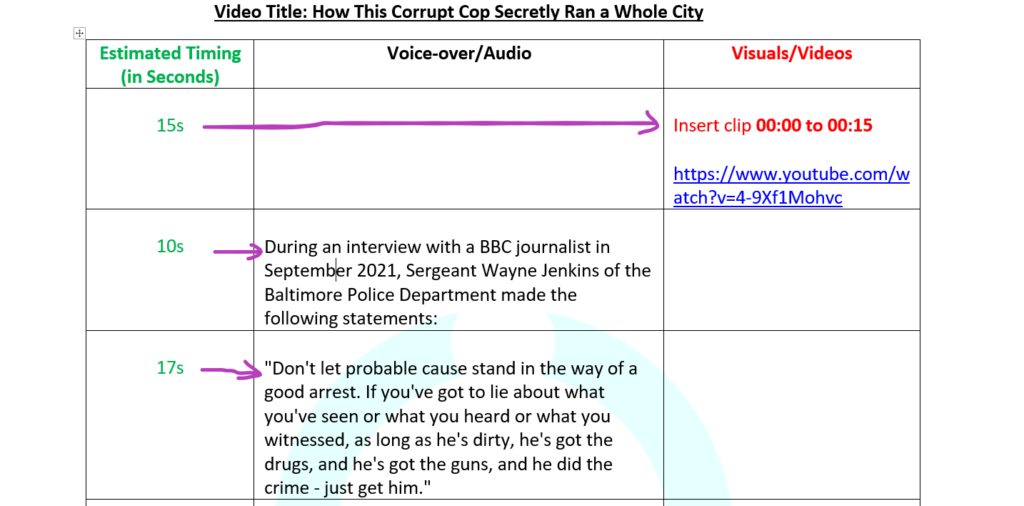
For your purposes, starting with inline notation is likely the most efficient approach.
Test your understanding!
Imagine you're scripting a line for your video essay about the philosophical concept of free will. The line is: "Ultimately, the debate boils down to a single, unsettling question."
How would you add both a tonal cue and a visual cue to this line?
Show answer
There are many great possibilities! Here is one example:
"Ultimately, the debate boils down to... (slow down, lower voice) ...a single, unsettling question. [VISUAL: A large, stylized question mark slowly fades onto a black screen]."
This combines a tonal cue to build suspense in the delivery with a simple, effective visual that focuses the audience's attention.
Your Task: Create the Final Blueprint
It's time to bring all of this together. Your task is to go through the script you've been working on and embed these two types of parenthetical notes, creating the final production-ready blueprint.
Instructions (Approx. 35-40 minutes):
- Open your script draft. You will be adding notes directly to the text.
- Formalize Tonal Cues: Go through the script, sentence by sentence. Take the pauses (
/), emphasis marks (<u>underline</u>), and margin notes from the last lesson and convert them into explicit parenthetical cues(like this).- Where you marked a pause, write
(pause). - Where you underlined a word, consider why. Is it for emphasis? Sarcasm? Wonder? Write the specific instruction, e.g.,
(with emphasis),(sarcastically),(in a hushed voice).
- Where you marked a pause, write
- Add Visual Cues: This requires some imagination. For every key point or even every few sentences, ask yourself: What should the audience be seeing right now? Add a visual cue in square brackets
[LIKE THIS].- Don't worry about finding the perfect footage yet. Just describe the idea.
- Examples:
[B-roll: time-lapse of a city at night],[TEXT ON SCREEN: 'Cogito, ergo sum'],[VISUAL: Simple stick figure looking confused at a fork in the road],[Show clip from the movie 'The Matrix'].
- Review the Integrated Script: Once you've completed a pass, read through a section of your newly annotated script. Imagine yourself recording the audio and editing the video. Does the script give you all the information you need? Adjust as necessary.
The example template in the "How to write Engaging YouTube Script" article (resource LINK, in the section titled "Example YouTube Script Template") is a great model for what an integrated script looks like.
Conclusion
Congratulations on completing the final lesson of this module! You have now transformed a piece of writing into a functional blueprint for a video essay. By embedding specific instructions for both tone and visuals, you've bridged the gap between your role as a writer and your future roles as narrator and editor. This methodical approach is what allows creators to produce work that feels polished, dynamic, and intentional.
Key Takeaways:
- A video essay script is a technical document that guides both audio performance and visual editing.
- Tonal cues, written in parentheses
(), formalize your delivery instructions for pace, emotion, and emphasis. - Visual cues, written in square brackets
[], describe the on-screen elements like B-roll, text, and graphics. - Integrating these notes directly into your script creates a comprehensive blueprint for production.
A Look Ahead:
You have now drafted, voiced, and planned a full video essay script. In our next module, "The Writer's Craft: Revision and Feedback," we will zoom out from this specific project to look at the broader principles of good writing. We'll start by exploring one of the most fundamental concepts for any writer: how to distinguish between the creative, generative process of drafting and the analytical, refining process of editing.