Hello! Welcome to the third lesson in your SQL journey.
In our last session, we learned how to filter data using the WHERE clause with comparison operators. This allowed you to ask questions about your data based on a single criterion, like finding all users on a specific subscription plan.
Today, we'll significantly increase the power and precision of your queries. We will focus on combining multiple criteria using the logical operators AND, OR, and NOT. This is the key to segmenting your user base into highly specific groups, a fundamental skill for any product professional. For instance, you'll be able to move from "show me all active users" to "show me all active users on the free plan who signed up more than a year ago."
By the end of this lesson, you will be able to segment users by combining criteria using the AND, OR, and NOT operators to create sophisticated and targeted filters.
1. The Logic of Combining Conditions
When you want to filter data based on more than one rule, you need a way to connect those rules. The logical operators AND, OR, and NOT act as this connective tissue.
A helpful way to visualize how these operators work is through Venn diagrams, which you might remember from mathematics. They show the logical relationships between different sets.
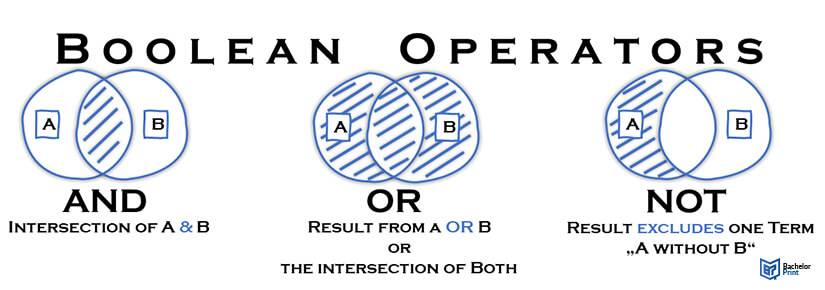
We will explore each of these operators one by one.
2. The AND Operator: Narrowing Your Search
The AND operator is used when you need rows to satisfy all of the specified conditions. It makes your filter more restrictive, narrowing down the results.
Think of it as asking for users who are "this and that."
Syntax:
SELECT column_name(s)
FROM table_name
WHERE condition1 AND condition2;
Example:
Imagine you want to identify highly engaged users on your top-tier plan. You need to find users where the subscription_plan is 'premium' AND their login_count is greater than 100.
SELECT user_id, email
FROM users
WHERE subscription_plan = 'premium' AND login_count > 100;
This query will only return users who meet both conditions. A user on a 'premium' plan with 50 logins will be excluded, as will a user with 200 logins who is on a 'free' plan.
To see this in action, let's watch a video that explains the logic and provides a practical demonstration.
SQL Logical Operators: AND, OR, NOT Explained - SQL Tutorial #16
This video from Data with Baraa clearly explains the logic behind the AND, OR, and NOT operators. We'll start with the section on AND.
Please watch the two segments on the AND operator: first, the theoretical explanation (00:41 - 01:54), and second, the practical SQL example (04:04 - 07:24). Notice how the database evaluates both conditions for each row.
3. The OR Operator: Broadening Your Search
The OR operator is used when you need rows to satisfy at least one of the specified conditions. It makes your filter less restrictive, potentially broadening your results.
Think of it as asking for users who are "this or that."
Syntax:
SELECT column_name(s)
FROM table_name
WHERE condition1 OR condition2;
Example:
Suppose your company is running a marketing campaign targeting users in Latin America, specifically in Colombia and Mexico. You want to pull a list of all users from either country.
SELECT user_id, email, country
FROM users
WHERE country = 'Colombia' OR country = 'Mexico';
This query will return users if their country is 'Colombia', and it will also return users if their country is 'Mexico'. A user only needs to satisfy one of these conditions to be included.
Now, let's return to the video to see the OR operator explained.
SQL Logical Operators: AND, OR, NOT Explained - SQL Tutorial #16
Let's continue with the same video to understand the OR operator.
Watch the segments on the OR operator: the theoretical explanation (01:44 - 03:09) and the practical example (07:24 - 09:29). Contrast its 'less strict' nature with the AND operator.
4. The NOT Operator: Excluding Criteria
The NOT operator is used to negate a condition. It selects rows for which a condition is false. This is incredibly useful for exclusion.
Think of it as asking for users who are "not this."
Syntax:
SELECT column_name(s)
FROM table_name
WHERE NOT condition;
Example:
You want to analyze the behavior of your paying customers. An easy way to define this segment is to find all users who are not on the 'free' plan.
SELECT user_id, email, subscription_plan
FROM users
WHERE NOT subscription_plan = 'free';
This query will return all users whose plan is 'premium', 'pro', 'enterprise', or anything other than 'free'.
Let's watch the final section of the video covering the NOT operator.
SQL Logical Operators: AND, OR, NOT Explained - SQL Tutorial #16
Finally, let's look at how the NOT operator works.
Watch the segments on the NOT operator: the theory (03:09 - 04:04) and the practical example (09:29 - 11:29). Note how it reverses the outcome of a condition.
5. Combining Operators and Order of Precedence
The real power comes from combining AND, OR, and NOT in a single query. However, when you do this, you must be aware of the order of operations. Just like in mathematics where multiplication is done before addition, SQL has a default order for logical operators:
NOTis evaluated first.ANDis evaluated second.ORis evaluated last.
This can lead to unexpected results if you're not careful. To control the order and make your queries unambiguous, you should always use parentheses ().
Example Scenario:
You want to find all users who are on a paid plan ('pro' or 'premium') AND are located in the USA.
Incorrect Query (without parentheses):
SELECT user_id, email
FROM users
WHERE subscription_plan = 'pro' OR subscription_plan = 'premium' AND country = 'USA';
Because AND is evaluated first, the database interprets this as: "Find all users who are on the 'pro' plan, OR find all users who are on the 'premium' plan and are in the USA." This is not what you wanted; it would incorrectly include 'pro' users from all countries.
Correct Query (with parentheses):
SELECT user_id, email
FROM users
WHERE (subscription_plan = 'pro' OR subscription_plan = 'premium') AND country = 'USA';
By using parentheses, you force the database to first evaluate the OR condition (find all users on 'pro' or 'premium' plans) and then apply the AND condition to that result set (filter for those who are in the USA).
This article provides an excellent summary of how to combine these operators effectively.
How to write multiple WHERE conditions in SQL?
This article from codedamn news, 'How to write multiple WHERE conditions in SQL?', clearly explains operator precedence and provides practical examples.
Please read the sections 'Mixing AND, OR, and NOT' and 'Practical Scenarios'. Pay close attention to the 'Order of Operations' and how parentheses are used to avoid common mistakes.
6. Practice: Segmenting Your Users
Let's put it all together. Using the same hypothetical users table, write queries for the following tasks. The table has columns like user_id, email, subscription_plan, country, and last_login_date.
Problem 1: Find all users from the 'USA' who are on the 'free' subscription plan.
Solution
SELECT user_id, email
FROM users
WHERE country = 'USA' AND subscription_plan = 'free';
Problem 2: You are planning a feature announcement for users in the UK and Canada. Write a query to get the email addresses of all users from either of these countries.
Solution
SELECT email
FROM users
WHERE country = 'UK' OR country = 'Canada';
Problem 3: To identify potentially churning users, you want to find everyone on a 'premium' plan who has not logged in since the start of the year (e.g., before '2023-01-01').
Solution
SELECT user_id, email, last_login_date
FROM users
WHERE subscription_plan = 'premium' AND last_login_date < '2023-01-01';
Problem 4 (Challenge): Find all users who are either from 'Germany' or 'France', but only if they are on a paid plan (i.e., not the 'free' plan).
Solution
SELECT user_id, email, country, subscription_plan
FROM users
WHERE (country = 'Germany' OR country = 'France') AND NOT subscription_plan = 'free';
Conclusion
Excellent work! You've now mastered the ability to combine filtering conditions, which is a massive step forward in your ability to query data effectively. You can now construct precise user segments to answer complex product questions.
Here are the key takeaways:
ANDrequires all conditions to be true, narrowing your results.ORrequires at least one condition to be true, broadening your results.NOTinverts a condition, allowing you to exclude data.- Parentheses
()are essential for controlling the order of operations and ensuring your query logic is correct and readable.
In our next lesson, we will look at the IN and NOT IN operators. These provide a more elegant and efficient way to check if a value matches any value in a list—a useful shortcut for long OR chains.