Welcome to your first lesson in the System Thinking and Architecture course! Your goal is to gain a deep technical understanding of backend systems, moving beyond high-level flows to grasp how services communicate and scale. The journey of a request across a network is a fundamental piece of this puzzle, and this first module will build that foundation.
Today, we'll start at the very beginning by exploring the conceptual map that governs all communication on the internet: the TCP/IP model. By the end of this lesson, you will be able to describe the roles of the main layers in this model. This framework is essential for understanding everything that follows, from how a domain name is found to how a secure connection is established.
The Need for a Model: Taming Complexity
Imagine two computers trying to communicate. They might have different hardware, be made by different manufacturers, and run entirely different operating systems. How can they possibly understand each other? The answer lies in a shared set of rules, or protocols.
To manage the immense complexity of this task, network communication is broken down into a series of layers. Each layer has a specific job and only needs to communicate with the layers directly above and below it. This is a core principle in system design called abstraction. The TCP/IP model is the most important layered framework for modern networks and the internet.
There are different versions of the model, some showing four layers and others five. The concepts are the same, but the five-layer model separates the functions more clearly, so we will focus on that. You might also hear about the seven-layer OSI model; it's a useful theoretical reference, but TCP/IP is the practical model the internet is built on.
Let's begin by getting a high-level overview of the two models and their relationship.

As you can see, the TCP/IP model is more streamlined. The top three layers of the OSI model (Application, Presentation, Session) are consolidated into a single Application Layer in TCP/IP. The bottom two OSI layers (Data Link, Physical) are sometimes shown as a single "Network Access" or "Link" layer in a four-layer TCP/IP model.
The Journey of Data: Encapsulation
When your computer sends data—like a request for a webpage—it starts at the top layer (Application) and moves down. At each layer, a piece of information, called a header, is added. This process is called encapsulation. The data is "wrapped" in layer-specific information, much like putting a letter in an envelope, then putting that envelope in a mailbag, and loading the bag onto a truck.
When the data reaches the destination server, the reverse process happens. It moves up the layers, and each layer unwraps (or decapsulates) the header added by its counterpart on the sending machine, reads the instructions, and passes the payload up.
This short video provides an excellent visual introduction to this process.
TCP/IP Model Explained | Cisco CCNA 200-301
This video from CertBros, "TCP/IP Model Explained," offers a concise overview of the model's layers and the encapsulation/decapsulation process.
Watch the entire video, which is about five minutes long. Pay close attention to: The comparison with the OSI model at the beginning. The encapsulation section, where the narrator explains how headers are added and what the data is called at each layer (Segment, Packet, Frame). The brief explanation of decapsulation on the receiving end.
Now, let's explore each of these layers in more detail.
The Five Layers of TCP/IP
We'll walk through the layers from top to bottom, following the path of an outgoing request.
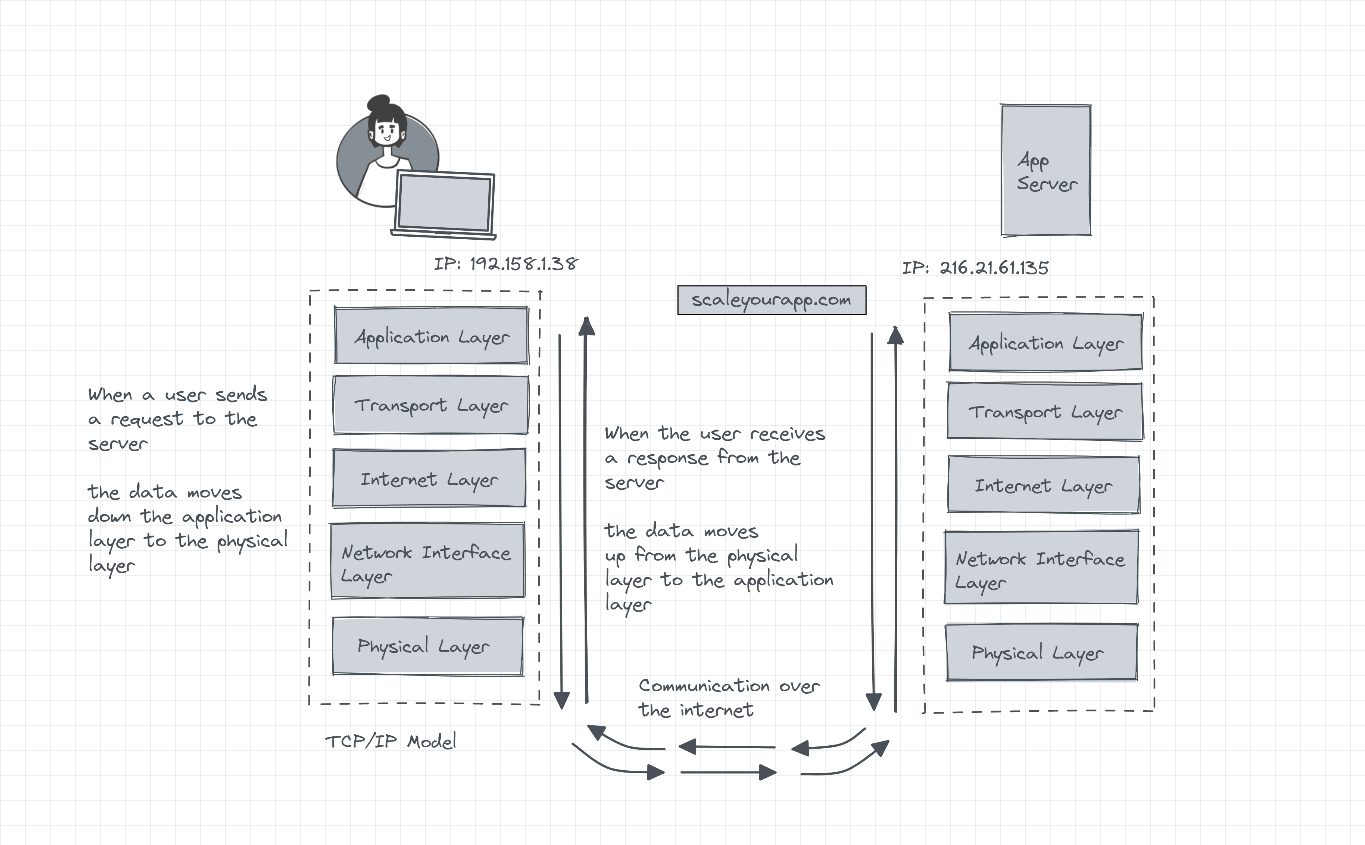
1. Application Layer
- Role: This is the layer you interact with most directly as a user and developer. It provides protocols that applications use to communicate over the network. When you use Postman to test an API, you are operating at this layer, using the HTTP protocol.
- Key Protocols: HTTP/HTTPS (for web browsing), SMTP (for email), FTP (for file transfer), and DNS (for resolving domain names to IP addresses, which we'll cover in the next lesson).
- Data Unit: At this layer, the data is simply referred to as a Message or Data.
2. Transport Layer
- Role: The transport layer is responsible for end-to-end communication between the specific applications on the source and destination hosts. It ensures data is delivered reliably and in order.
- Key Protocols:
- TCP (Transmission Control Protocol): Provides reliable, ordered, and error-checked delivery of a stream of bytes. It establishes a connection before sending data (a "three-way handshake"). This reliability comes with a bit more overhead. Most of what you do on the web, like loading a page, uses TCP.
- UDP (User Datagram Protocol): Provides a much simpler, faster, but unreliable service. It sends packets of data (datagrams) without establishing a connection first. It's great for applications where speed is more important than perfect reliability, like video streaming or online gaming.
- Key Concept: Ports: While an IP address gets data to the correct computer, a port number gets data to the correct application on that computer. For example, web traffic (HTTP) is typically directed to port 80, and secure web traffic (HTTPS) to port 443.
- Data Unit: Segment (for TCP) or Datagram (for UDP).
3. Network Layer (or Internet Layer)
- Role: This layer is responsible for moving packets from the source host to the destination host across one or more networks. This is the core of "internetworking." It deals with logical addressing and routing. Routers operate at this layer to determine the best path for data to travel.
- Key Protocols: IP (Internet Protocol) is the primary protocol. It defines the IP address, which is a unique logical address for every device on the network.
- Data Unit: Packet. An IP Packet contains the Transport Layer segment along with an IP header containing the source and destination IP addresses.
4. Data Link Layer
- Role: While the Network Layer gets the packet from the source network to the destination network, the Data Link Layer is responsible for moving it between devices on the same local network. It handles physical addressing.
- Key Concept: MAC Addresses: Network Interface Cards (NICs) in your devices have a unique physical address burned into them by the manufacturer, called a MAC (Media Access Control) address. Switches on a local network use MAC addresses to forward data to the correct physical device.
- Technologies: Ethernet and Wi-Fi are the most common Data Link Layer technologies.
- Data Unit: Frame. A frame wraps the Network Layer packet with a header containing the source and destination MAC addresses.
5. Physical Layer
- Role: This layer is all about the physical hardware that transmits raw data. It converts the digital 1s and 0s of the frame into electrical signals, light pulses, or radio waves and sends them over the transmission medium.
- Hardware: Cables (like Ethernet or fiber optic), network interface cards (NICs), and hubs.
- Data Unit: Bits.
To solidify your understanding, the following article provides a detailed walk-through of these layers.
IP layers and the TCP/IP model - A deep dive - Scaleyourapp
This article from Scaleyourapp gives a thorough explanation of the five-layer TCP/IP model. It starts with the OSI model for context before diving into the practical TCP/IP stack.
Please read the sections titled "TCP/IP model" and "TCP/IP model layers/architecture". As you read, focus on the specific function of each of the five layers: Application, Transport, Internet, Network Interface, and Physical. Pay special attention to the explanation of ports in the Transport Layer section, as this is a crucial concept for backend development.
Summary and What's Next
You've now taken the first step toward understanding the technical details of network communication. We've seen that by organizing communication into layers, the TCP/IP model simplifies the complex task of sending data across the internet.
Here are the key takeaways:
- The TCP/IP model is a layered framework that standardizes how computers communicate over a network.
- It consists of five main layers: Application (user-facing services), Transport (end-to-end communication via TCP/UDP and ports), Network (routing packets across networks using IP addresses), Data Link (moving frames on a local network using MAC addresses), and Physical (transmitting raw bits).
- Data is encapsulated with a header at each layer as it travels down the stack on the sending device and decapsulated as it travels up the stack on the receiving device.
In our next lesson, we will dive into a critical Application Layer protocol: DNS. You'll learn exactly what happens when you type a domain name like google.com into your browser and how your computer finds the correct IP address to send a request to. This will connect the concepts of the Application and Network layers in a very practical way.