Welcome to the next major phase of building your multi-tool platform! So far, you've done an excellent job constructing the core of your application within Bubble—you've built the database, designed pages, and even created a personalized user dashboard. Your app is a self-contained world. Now, it's time to open the doors and connect that world to the vast universe of services and tools on the internet.
This lesson marks the beginning of our module on integrating external services. It's a purely conceptual lesson, designed to give you the fundamental vocabulary and mental models you'll need. We're going to answer the question: "How do different applications on the web actually talk to each other?" Understanding this is the key to achieving the "deep integration" you're aiming for. We will specifically focus on the roles of REST APIs, requests like GET and POST, and the data format known as JSON.
What is an API? The Digital Waiter
At its heart, an API (Application Programming Interface) is a messenger, or an intermediary, that allows two separate software applications to communicate with each other.
Imagine you're in a restaurant. You (the client) want to order food, which is prepared in the kitchen (the server). You can't just walk into the kitchen and grab the ingredients yourself. Instead, you interact with a waiter (the API).
- You give the waiter your request (your order).
- The waiter takes the request to the kitchen.
- The kitchen prepares the food and gives it to the waiter.
- The waiter brings the food (the response) back to your table.
This analogy is a powerful way to think about how your Bubble app will interact with external services. Your app will be the client, the external service (like a currency converter or a weather service) will be the server, and the API will be the waiter handling the communication between them.
The following short video provides a great visual explanation of this concept.
A Beginner's Guide to REST APIs in Under 10 Minutes!
This video from Cloudmancer offers a concise introduction to APIs, using the very restaurant analogy we just discussed.
Watch the first two minutes to solidify your understanding. Pay attention to how it defines an API's role as a standardizer of communication and then visualizes the client-waiter-kitchen interaction.
The Rules of Conversation: REST APIs
The waiter analogy is great, but for it to work, everyone involved needs to follow a set of rules. The waiter needs to know how to take an order, what format to write it in, and how to deliver the food. In the world of web APIs, one of the most common and important set of rules is called REST.
REST stands for REpresentational State Transfer. You don't need to memorize the name, but you should understand what it represents: a style of architecture for APIs that is simple, scalable, and predictable. Most modern web services you'll want to connect to use a REST API, which makes our job much easier.
Let's look at the flow of a typical REST API interaction.
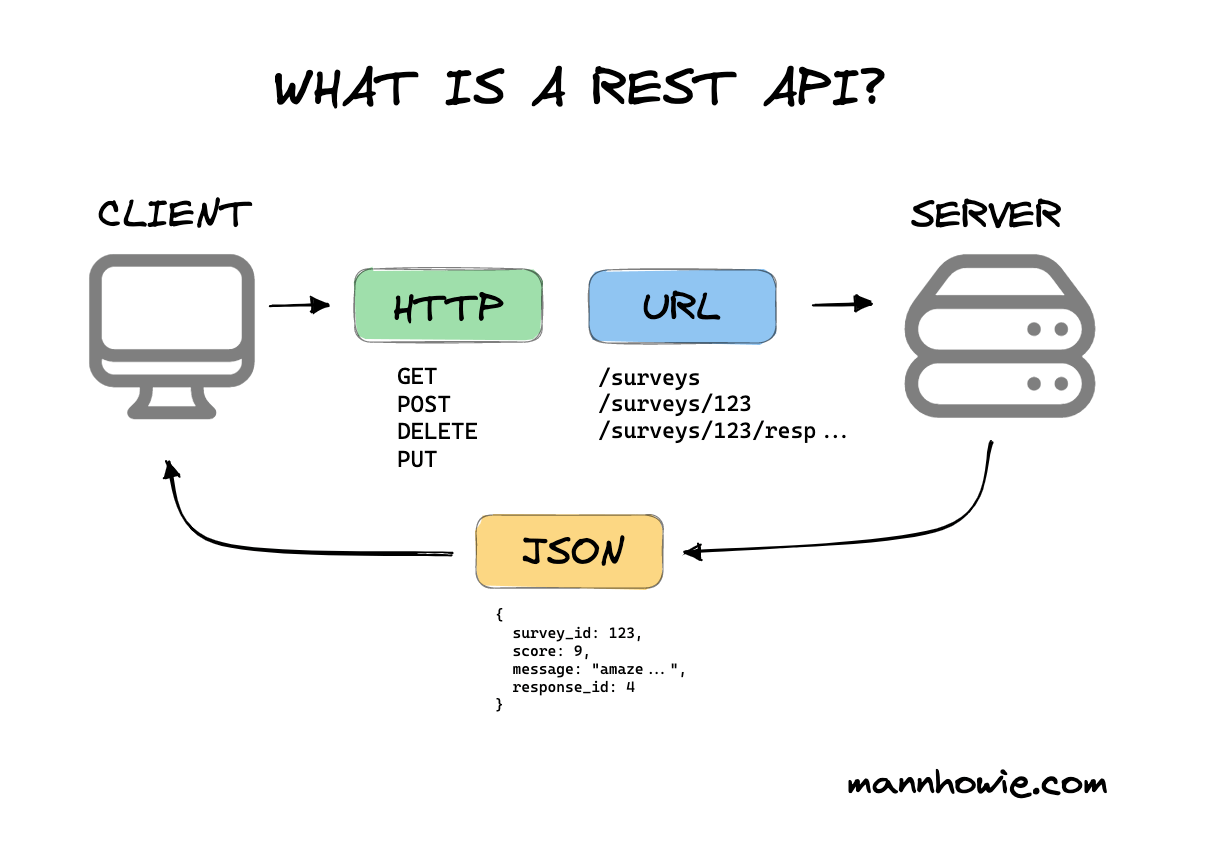
As you can see in the "REST API Diagram," the conversation has two main parts: the Request sent by the client and the Response sent by the server.
The Bubble documentation provides a fantastic, in-depth explanation of these concepts from a Bubble developer's perspective.
What is a RESTful API? | Bubble Docs
This article from the official Bubble Manual explains the principles of REST and the components of an API call.
First, read the introductory section What is a RESTful API? to understand the core principles like statelessness and client-server independence. Then, continue to the next section, What a RESTful API call looks like, which sets the stage for breaking down the request.
Anatomy of a Request: What Are You Asking For?
When your app (the client) makes a request, it needs to be very specific. A REST API request is made up of a few key parts, but for now, we'll focus on the two most important ones: the URL and the Method.
-
URL (Endpoint): This is the address of the resource you want to interact with. Think of it as the server's address combined with the specific department you need to talk to. For example, an API for a dictionary app might have an endpoint like
https://api.dictionary.com/v1/words/bubble. -
Method (HTTP Verb): This defines your intention. What do you want to do with that resource? The two most fundamental methods you'll use constantly are
GETandPOST.
- GET: Used to retrieve data from the server. This is a read-only operation. It's like asking the waiter for the menu or checking the status of your order. You're not changing anything, just asking for information.
- POST: Used to send data to the server to create a new resource. This is like giving the waiter a new food order. You are sending new information to be processed and stored.
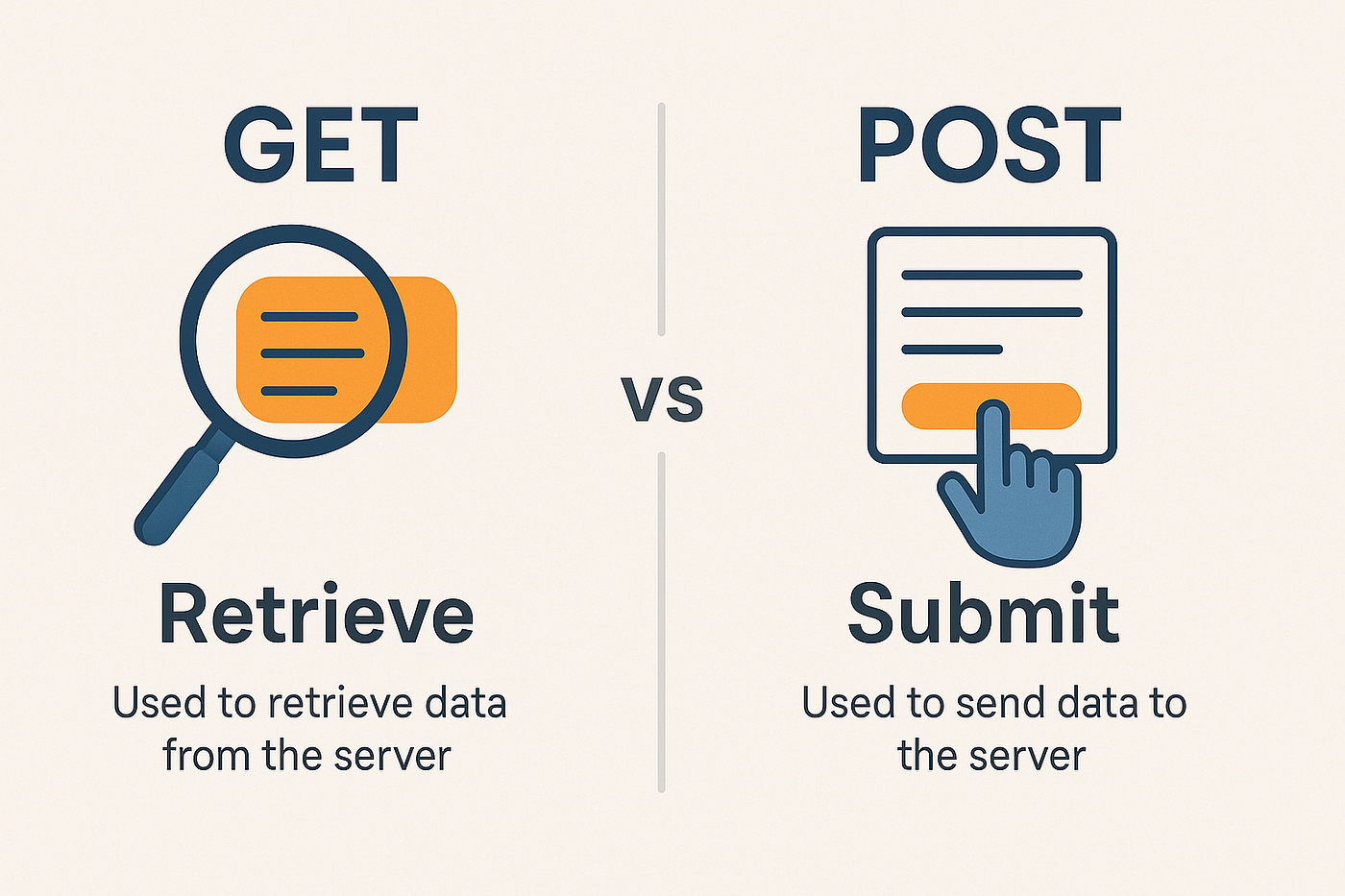
Understanding the difference between GET and POST is crucial. Bubble's own API Connector plugin, which you'll use in the next lesson, is built around these "HTTP verbs."
Intro to APIs & the API Connector | Bubble Crash-Course
This official Bubble tutorial explains the five most common HTTP requests from the perspective of the API Connector.
Watch the segment covering the different verbs, from the beginning of the section up through the explanation of GET. Then, listen to the explanation of the POST request. This will directly prepare you for the interface you'll see in Bubble.
The Server's Reply: The Response and JSON
Once the server receives and processes your request, it sends back a response. This response contains two key things: a status code (like "200 OK" for success or "404 Not Found" for an error) and, if the request was successful, the data you asked for.
But how is that data structured? In the early days of the web, formats like XML were common, but today, the undisputed standard for REST APIs is JSON (JavaScript Object Notation).
Despite its name, you don't need to know JavaScript to understand JSON. It's a simple, text-based format for representing data using key-value pairs. Given your background in web design and using tools like Advanced Custom Fields, this concept might feel familiar.
Here’s what a simple JSON object looks like:
{
  "survey_id": 123,
  "score": 9,
  "message": "amaze...",
  "response_id": 4
}
As you can see, it's just a label (the key, like "score") followed by its data (the value, like 9). This format is both easy for humans to read and for computers (like your Bubble app) to parse. Bubble is designed to work seamlessly with JSON, making it incredibly easy to pull data from an API response and display it in your app.
For a final clarification on these pieces, let's turn back to the Moesif article.
API for Dummies: Your Easy Guide to Understanding APIs
This article provides a clear, beginner-friendly explanation of how API calls are constructed and how they use JSON.
Please read the following three short sections: Start with How APIs Work to see the request-response cycle explained step-by-step. Then, read The Language of APIs to understand why JSON is the preferred format. Finally, review the section Building Your First API Call, which summarizes the process of choosing a method (GET to retrieve, POST to add) and interpreting the response.
Conclusion
Excellent work navigating these new concepts. This lesson was all about building a mental framework. You're now equipped with the essential vocabulary to understand how modern web applications communicate, which is the first and most critical step toward integrating powerful external tools into your platform.
Let's summarize the key takeaways:
- API (Application Programming Interface): An intermediary (like a waiter) that allows different software applications (a client and a server) to communicate.
- REST (Representational State Transfer): A popular set of architectural rules that makes API communication predictable and standardized.
- Request: A message sent from the client to the server, specifying an endpoint (URL) and an intention (Method).
- GET Request: Used to retrieve or "get" data from a server. It's a read-only action.
- POST Request: Used to send or "post" data to a server, typically to create a new resource.
- Response: A message sent back from the server to the client, containing a status code and the requested data.
- JSON (JavaScript Object Notation): The standard, human-readable data format used to structure the information in an API response.
In our next lesson, we will put this theory into practice. You'll install the Bubble API Connector plugin and make your first live GET request to a public API. You'll see these concepts of URLs, methods, and JSON responses come to life right inside the Bubble editor.