Welcome to your fifth lesson. In our previous session, you learned how to control your program's flow by making decisions with if, elif, and else statements. This gave your code the ability to execute different blocks of code once based on a condition.
Today, we will unlock an even more powerful capability: repetition. This lesson introduces loops, which allow you to run a block of code over and over again. This is fundamental to almost every meaningful program, from simple automation to the complex AI models you're aiming to build. For an AI model to learn, it must process thousands or even millions of data points; loops are what make this possible.
By the end of this lesson, you will be able to write for and while loops to iterate over sequences and control their execution.
Two Flavors of Repetition: for and while
Python provides two primary types of loops for handling repetition, and choosing the right one depends on your task:
- The
forloop: Use this when you want to iterate a specific number of times or go through every item in a collection (like the characters in a string or the items in a list). You know in advance how many times the loop will run. - The
whileloop: Use this when you want to iterate as long as a certain condition is true. You don't necessarily know how many repetitions it will take for the condition to become false.
Let's explore each one in detail.
The for Loop: Iterating Over a Sequence
The for loop is your go-to tool for definite iteration. The most common way to create a for loop is with Python's built-in range() function, which generates a sequence of numbers.
The video below from Programming with Mosh provides an excellent introduction to the for loop and the range() function.
Python For Loops - Python Tutorial for Absolute Beginners
This video clearly explains the syntax of a for loop and demonstrates how to use range() to control the number of iterations.
Watch these two segments: The first part of the video introduces the basic for loop syntax and shows how the loop variable changes with each iteration. Next, watch the segment on customizing the range to see how you can specify a start, stop, and step value.
As you saw, the range() function is versatile. range(5) gives you numbers from 0 to 4. range(1, 5) gives you numbers from 1 to 4. And range(1, 10, 2) gives you numbers from 1 to 9, skipping every other one.
While range() is very common, for loops are not limited to numbers. They can iterate over any iterable object, such as a string (character by character) or a list of items.
Python For Loops - Python Tutorial for Absolute Beginners
This segment expands on the concept of iterables, showing that for loops work with more than just range() objects.
Watch from the section on iterables to see examples of looping through a string and a list.
The while Loop: Looping on a Condition
Now, let's turn to the while loop. You use a while loop when you want code to repeat as long as a condition holds true. Think of a game that keeps running while the player's health is greater than zero.
The image below breaks down the essential components of a while loop.
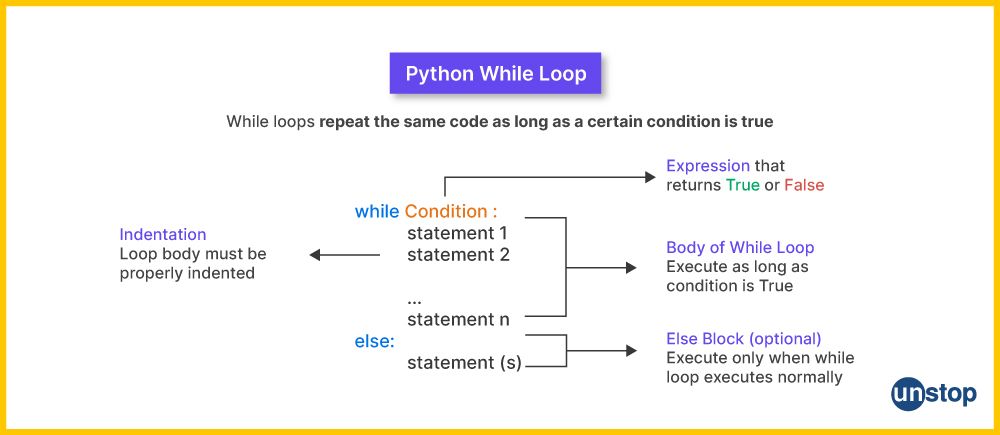
A critical part of a while loop is ensuring the condition eventually becomes False. If it doesn't, you'll create an infinite loop, where your program gets stuck and runs forever. This usually happens when you forget to update the variable being checked in the condition.
This video from Dave Gray provides a clear, practical demonstration.
Python While Loops & For Loops | Python tutorial for Beginners
This video demonstrates a basic while loop, emphasizing the importance of incrementing the counter to avoid an infinite loop.
Watch the segment from the beginning to see how a while loop is constructed and executed.
For a quick written reference on both loop types, the article "Loops" from learnpython.org is a great resource.
Loops - Learn Python - Free Interactive Python Tutorial
This article provides concise definitions and code examples for both for and while loops.
Read the section on "for" loops and the following section on "while" loops.
Controlling Loop Behavior: break and continue
Sometimes, you don't want a loop to run to completion. You might need to exit early or skip the rest of the current iteration. Python gives you two keywords for this, which are often used inside an if statement within the loop:
break: Immediately terminates the loop and continues execution at the first statement after the loop.continue: Immediately stops the current iteration and jumps to the top of theloop to begin the next iteration.
Dave Gray's video demonstrates these control statements effectively.
Python While Loops & For Loops | Python tutorial for Beginners
This video shows how break and continue can alter the flow of both while and for loops.
Watch how these keywords work in a while loop from this segment. Then, see them applied to a for loop in the section from this part.
Hands-On Practice 1: Finding Even Numbers
It's time to write some code. Open a new Jupyter Notebook. The following exercise combines a for loop, the range() function, and an if statement.
Problem: Write a program that:
- Counts how many even numbers there are between 1 and 10 (exclusive of 10).
- Prints each even number it finds.
- After the loop finishes, prints a message like "We have 4 even numbers."
Try to solve this on your own first. If you get stuck, the solution is demonstrated in the video where this exercise was proposed.
Python For Loops - Python Tutorial for Absolute Beginners
This video walks through the problem and presents a clear solution.
You can watch the entire exercise segment from the beginning to the end to see how it's done.
Nested Loops: A Loop Within a Loop
You can place one loop inside another. This is called a nested loop. For every single iteration of the outer loop, the inner loop will run through all of its iterations.
This technique is incredibly useful for working with grid-like or two-dimensional data, such as the pixels in an image or rows and columns in a spreadsheet—tasks that are very common in data analysis and machine learning.
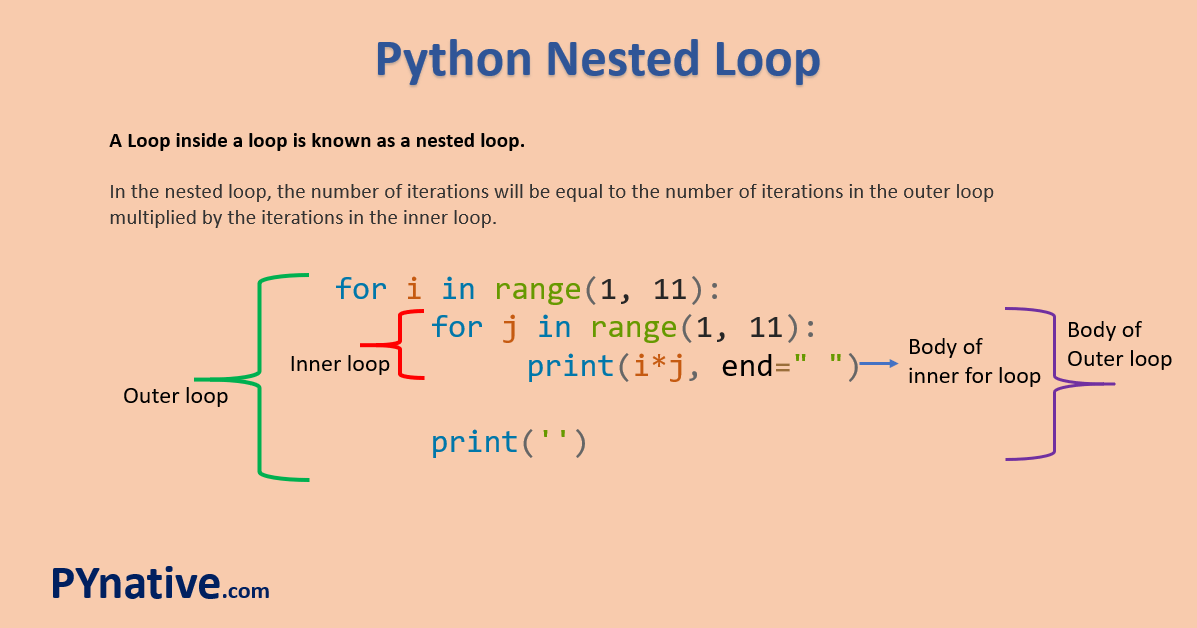
The following video demonstrates how nested loops work by printing out coordinates.
Python For Loops - Python Tutorial for Absolute Beginners
This segment provides a clear visualization of how the outer and inner loop variables change during execution.
Watch the section on nested loops to understand the execution flow.
Hands-On Practice 2: Building a Star Pattern
Here is a classic exercise to help you master nested loops.
Problem: Use nested for loops to construct the following pattern of stars:
*
* *
* * *
* * * *
* * * * *
* * * *
* * *
* *
*
Hint: You will need two separate for loops, one after the other. Each of these loops will contain a nested for loop. The first one builds the top half, and the second one builds the bottom half.
Give it a try in your notebook. The solution is available in the DataCamp article below.
Python Loops Tutorial: For & While Loop Examples
This article section on nested loops includes the star pattern exercise with a full solution.
Scroll down to the "Nested Loops" section. Attempt the exercise, then review the code provided under the image of the star pattern by clicking the code sample to reveal the solution. Focus on the two main loop blocks in the solution.
Conclusion
In this lesson, you've gained the crucial skill of repetition using loops. This is a massive step forward in your ability to write powerful programs that can process data efficiently.
Here are the key takeaways:
forloops are used for definite iteration, when you know how many times you want to loop or want to iterate through every item in a sequence like arange,string, orlist.whileloops are used for indefinite iteration, repeating as long as a condition isTrue. You must ensure the condition eventually becomesFalseto avoid infinite loops.breakandcontinuegive you fine-grained control over a loop's execution, allowing you to exit early or skip iterations.- Nested loops allow you to process data in multiple dimensions by placing one loop inside another.
In our next lesson, we will combine everything you've learned about conditionals and loops to solve more complex logic problems. You'll see how these two concepts work together as the fundamental building blocks for almost any algorithm.