Introduction
Welcome back! In our last lesson, you familiarized yourself with the Godot editor, creating a project and organizing its basic folder structure. You now have a mental map of where the main tools are located.
Today, we're moving from the "what" to the "why" and "how." We will explore Godot's fundamental architectural principle: the scene-node system. This is the core concept you need to understand to build anything in Godot.
Our main goal is to demonstrate this architecture by composing a simple scene. Crucially, we will contrast this approach with the classical object-oriented (OOP) inheritance hierarchies you are deeply familiar with from your experience as a Java developer. Grasping this difference is the key to "thinking in Godot."
By the end of this lesson, you'll understand what scenes and nodes are, how they fit together, and why Godot's compositional approach is so well-suited for game development.
From Inheritance to Composition: A Paradigm Shift
In your work with Java, you've undoubtedly encountered and built deep inheritance hierarchies. A classic example is the Java Swing UI library, where a JButton inherits a vast amount of functionality from its ancestors.

This model works well for many applications, but it can become rigid and cumbersome in game development, where entities often share disparate sets of functionalities. For instance, what if you have a Player, an Enemy, and a destructible Tree?
- The
PlayerandEnemymight shareHealthandAttackcapabilities. - The
Playerneeds to respond to userInput. - The
Treealso hasHealthbut doesn't attack or move.
If you create a base Entity class with all this functionality, the Tree inherits methods it doesn't need. If you create a more complex hierarchy, you can quickly end up with a tangled web of classes that is difficult to manage.
Godot encourages a different approach: composition over inheritance. Instead of an object being something, it has things. A Player isn't a single monolithic class; it's an object composed of smaller, independent parts: a part for health, a part for visuals, a part for input handling, and so on.
To see this principle in action, watch the first three minutes of the following video. It provides an excellent explanation of why composition is often preferable in game development.
How You Can Easily Make Your Code Simpler in Godot 4
This video from Bitlytic clearly contrasts the inheritance and composition patterns using simple game development examples.
Watch from the beginning to 03:05. Pay close attention to the 'Tree' example and how it highlights the limitations of inheritance, and then see how composition provides a more flexible solution.
In Godot, these "components" are called nodes, and a collection of nodes organized into a tree is called a scene.
Building Your First Scene: The "Goblin"
Let's make this concrete by building a simple "creature" for our card game. We'll create a visual representation for a Goblin. This is your first practical step in building a game element.
-
Create a New Scene:
- In the Scene dock (top-left), click the
+icon ("Add New Scene"). - Godot will prompt you to create a root node. The root node is the top-level node of your scene's tree.
- Select
Node2Dand click "Create".Node2Dis a basic 2D node that provides position, rotation, and scale—a great starting point for any 2D game object. - Immediately rename the
Node2DtoGoblinby double-clicking it in the Scene dock. - Save the scene by pressing
Ctrl+S(Cmd+Son Mac). Save it inside yourscenesfolder asgoblin.tscn. The.tscnextension denotes a Godot scene file.
- In the Scene dock (top-left), click the
-
Give it a Visual (Composition in Action):
- Our
Goblinnode has a position, but it's invisible. To give it a visual, we will add a child node. - Right-click the
Goblinnode in the Scene dock and select "Add Child Node". - Search for
Sprite2Dand click "Create". - Notice the
Sprite2Dnode appears nested underGoblin. OurGoblinscene is now composed of aNode2Dand aSprite2D. TheSprite2D's sole job is to display a texture. - With the
Sprite2Dselected, look at the Inspector on the right. Find theTextureproperty. For now, drag theicon.svgfile from the FileSystem dock into this slot. You should see the Godot icon appear in the viewport.
- Our
-
Give it a Name:
- Let's add another component for its name. Right-click the
Goblinnode again and add aLabelchild node. - Select the
Labelnode. In the Inspector, find theTextproperty and type "Goblin". - Use the move tool (or set the
Positionproperty in the Inspector) to place the label below the sprite.
- Let's add another component for its name. Right-click the
Your scene tree should now look like this:
Goblin(Node2D)Sprite2DLabel
You have just built a game object using composition! Instead of creating a Goblin class that inherits from some RenderableGameObject class, you've assembled a Goblin from distinct, single-purpose nodes.
The Scene as a Blueprint
This goblin.tscn file is now a reusable blueprint. You can drag it into other scenes to create instances of your goblin, just like you would instantiate a class in Java. If you modify the goblin.tscn blueprint (e.g., change the sprite), all instances of it in your game will update automatically.
As scenes become more complex, you can use plain Node objects as "folders" to organize your components, much like you might use packages in Java.
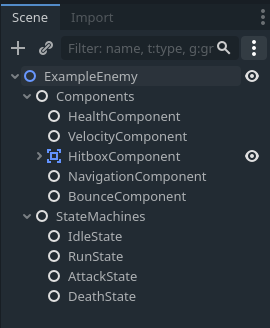
The Godot documentation has an excellent page on scene organization. Given your background, you'll find the connections it draws to OOP principles like loose coupling and dependency injection particularly relevant.
Scene organization - Godot Docs
This official documentation on 'Scene organization' explains the best practices for structuring scenes and managing the relationships between nodes. It uses terminology that will be very familiar to you from software engineering.
Read the section titled 'How to build relationships effectively'. Focus on how it connects Godot's design to OOP concepts like loose coupling and dependency injection.
The key takeaway is that child nodes should ideally know nothing about their parent. The parent node is responsible for connecting to its children's signals or calling their methods, creating a loosely coupled and highly reusable system.
Advanced Composition: Component Scenes
The real power of this model shines when you create your own reusable components as scenes. Imagine you need many different game objects to have health. Instead of adding a health variable to every script, you could create a HealthComponent.tscn. This scene might just contain a single Node with an attached script that manages health and emits a died signal when health reaches zero.
You could then instance this HealthComponent.tscn as a child of your Goblin, Player, or even a destructible Wall. The main script for each of those objects would simply connect to the died signal to handle the consequences.
The following video demonstrates this advanced pattern. It uses C#, but the architectural concepts are identical in GDScript and are very powerful.
Using Composition to Make More Scalable Games in Godot
This video from Firebelley Games showcases how to build scalable game entities by creating custom components as scenes.
Watch from 03:31 to 08:30. The code is in C#, but focus on the architecture: how the 'skull' entity is built by adding separate component scenes like HealthComponent and VelocityComponent. Notice how the main script for the skull (shown at 07:31) becomes very simple, acting only as 'glue' to connect these components.
We will be using this powerful pattern extensively as we build your card game, creating reusable components for things like card effects, mana costs, and creature abilities.
Conclusion
In this lesson, we've taken a deep dive into Godot's core architecture. You've moved beyond just knowing the editor layout to understanding the philosophy behind it.
Here are the key takeaways:
- Composition over Inheritance: Godot favors building objects by combining independent nodes rather than using rigid class hierarchies. An object is defined by what it has (its child nodes).
- Nodes are Building Blocks: Each node has a specific, focused purpose (e.g.,
Sprite2Ddisplays an image,Labeldisplays text). - Scenes are Blueprints: A scene is a tree of nodes that can be saved, instantiated, and nested within other scenes, acting as a reusable template.
- Loose Coupling: The architecture naturally encourages a loosely coupled design, where components (nodes/scenes) can be reused in different contexts without modification.
You've successfully created your first scene by composing it from nodes, a fundamental skill for all Godot development.
Preview of the Next Lesson:
Now that you have a scene, the next step is to make it interactive. In the next lesson, you'll write your first lines of GDScript. We'll attach a script to our Goblin scene and explore GDScript's variables, functions, and control flow, directly contrasting its syntax and features with Java to get you coding comfortably as quickly as possible.