Hello! Welcome to the next lesson in your C pointers course.
In our last lesson, we explored how data layout and access patterns are critical for CPU cache performance. We discussed alignment in the context of fitting data neatly into cache lines and preventing false sharing. Today, we'll pivot from performance optimization to correctness, a distinction that is absolutely critical in your field of embedded and automotive systems.
This lesson directly addresses the learning outcome: Handle pointer alignment requirements for different embedded architectures. You'll learn why alignment isn't just a suggestion but a strict hardware rule on many processors, what happens when you break that rule, and how to use pointers and language features to manage alignment explicitly.
1. What is Data Alignment?
At its core, data alignment is a simple rule imposed by the CPU architecture: an object of size N bytes must be stored at a memory address that is a multiple of N.
- A
char(1 byte) can be stored at any address. - A
uint16_t(2 bytes) must be stored at an even address (0, 2, 4, ...). - A
uint32_t(4 bytes) must be stored at an address divisible by 4 (0, 4, 8, ...). - A
doubleoruint64_t(8 bytes) must be stored at an address divisible by 8 (0, 8, 16, ...).
This is known as natural alignment.
To get a clear visual of this concept, let's watch a short video.
The video 'Lecture 8/12: Data Alignment' provides a concise and clear explanation of the fundamental rules of data alignment for different data sizes.
Please watch from the beginning to 04:16. The video visually demonstrates how half-word, word, and double-word data must be placed at specific address boundaries in memory.
Since C11, you can programmatically query the alignment requirement of any type using the _Alignof operator. This is useful for writing portable code that needs to be aware of platform-specific alignment rules.
#include <stdio.h>
#include <stdalign.h> // For alignof, which is a more convenient macro for _Alignof

int main(void) {
    printf("Alignment of char: %zu\n", alignof(char));       // Expected: 1
    printf("Alignment of short: %zu\n", alignof(short));     // Expected: 2
    printf("Alignment of int: %zu\n", alignof(int));         // Expected: 4
    printf("Alignment of double: %zu\n", alignof(double));   // Expected: 8
    printf("Alignment of void*: %zu\n", alignof(void*));     // 4 on 32-bit, 8 on 64-bit
    return 0;
}
2. Why Alignment Matters: Performance vs. Faults
So, what happens if you try to access, for example, a 4-byte int from an address that isn't a multiple of 4? The answer depends entirely on the CPU architecture.
-
Permissive Architectures (e.g., x86/x86-64): The CPU handles the unaligned access in hardware. It performs two separate aligned memory reads to fetch the pieces of your data and then stitches them together inside a register. This works, but it incurs a significant performance penalty because it doubles the number of memory accesses.
-
Strict Architectures (e.g., ARM, MIPS): Many embedded processors, including those commonly used in ADAS ECUs, do not handle unaligned access automatically. An unaligned access attempt causes the CPU to generate a hardware exception, such as a
Bus FaultorData Abort. If not handled by the operating system or a fault handler, this will crash your program.
Given your work with automotive systems built on microcontrollers, you are far more likely to encounter the second scenario. For you, alignment is a matter of program correctness and stability, not just performance.
10 Things You Should Know About Memory Alignment
The article '10 Things You Should Know About Memory Alignment' by Nick Miller provides an excellent summary of why unaligned access is problematic and how its effects vary.
Please read section 1, 'Unaligned memory access is bad'. It succinctly explains the architecture-dependent consequences, which is the key takeaway of this section.
3. Automatic Alignment: Structure Padding
How does C ensure variables are aligned correctly? For simple local or global variables, the compiler can easily place them at valid addresses. The more interesting case is with structs.
The compiler enforces alignment rules by inserting unused bytes, called padding, between members of a struct.
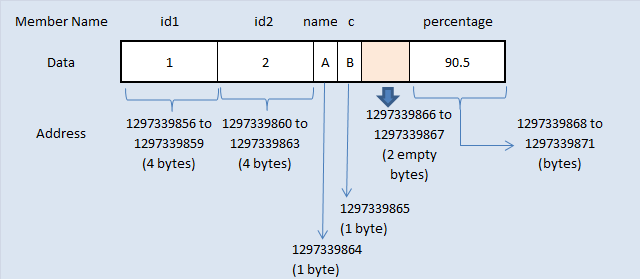
The two main rules of struct padding are:
- Each member is placed at an offset from the start of the struct that is a multiple of its own alignment requirement.
- The total size of the struct will be padded so it is a multiple of the alignment of its largest member. This ensures that in an array of structs, every struct instance will start on a correct boundary.
Let's watch a video that demonstrates this perfectly.
Structure Padding | C Programming Tutorial
The video 'Structure Padding | C Programming Tutorial' explains why the size of a struct is often larger than the sum of its parts, showing exactly how padding is added and why.
Please watch from the beginning to 05:34. The video clearly explains: How sizeof(struct) can be surprising. The hardware reason for alignment (CPU reading memory in 'words'). How the compiler calculates and adds padding based on member types.
Optimizing for Space: Member Reordering
As the video and article mention, the compiler is not allowed to reorder the members of your struct. However, you can. By ordering struct members from largest to smallest, you can often minimize the amount of padding required, saving memory. This is a common and important optimization in memory-constrained embedded systems.
Before (sub-optimal):
struct SensorData_A {
    char status;    // 1 byte (+ 3 bytes padding)
    int value;      // 4 bytes
    char id;        // 1 byte (+ 7 bytes padding)
    double timestamp; // 8 bytes
}; // Total size: 24 bytes
After (optimal ordering):
struct SensorData_B {
    double timestamp; // 8 bytes
    int value;      // 4 bytes
    char status;    // 1 byte
    char id;        // 1 byte (+ 2 bytes padding to make total size multiple of 8)
}; // Total size: 16 bytes
Test your understanding!
Given a 32-bit system (where int and pointers are 4 bytes), calculate the size of the following struct. Assume short is 2 bytes and char is 1 byte.
struct CommsPacket {
    char protocol_version;
    int payload_length;
    short checksum;
};
What is the sizeof(struct CommsPacket) and where are the padding bytes? How could you reorder it to save space?
Show answer
The layout would be:
char protocol_version;at offset 0 (1 byte).- 3 bytes of padding to align the next member.
int payload_length;at offset 4 (4 bytes).short checksum;at offset 8 (2 bytes).- 2 bytes of padding at the end to make the total size a multiple of 4 (the largest alignment).
Total size: 1 + 3 + 4 + 2 + 2 = 12 bytes.
To optimize, reorder largest to smallest:
struct CommsPacket_Optimized {
    int payload_length;   // 4 bytes
    short checksum;         // 2 bytes
    char protocol_version;  // 1 byte
                            // + 1 byte padding to make total size a multiple of 4
};
The optimized size is 4 + 2 + 1 + 1 = 8 bytes.
4. Explicit Alignment Control
Sometimes, you need to deviate from the default alignment.
A. Forcing Tighter Packing
In your work with communication protocols like CAN or SOME/IP, message formats are often defined by a specification where every byte counts. There is no room for padding. You need to tell the compiler to pack the struct tightly.
You can do this using a compiler-specific attribute or a #pragma.
// GCC/Clang attribute
struct __attribute__((packed)) CAN_Message {
    uint32_t id;
    uint8_t dlc;
    uint8_t data[8];
};

// or using a pragma (restored with #pragma pack())
#pragma pack(push, 1)
struct SOME_IP_Header {
    uint16_t service_id;
    uint16_t method_id;
    uint32_t length;
    // ... other fields
};
#pragma pack(pop)
Warning: Accessing a multi-byte member of a packed struct (e.g., some_ip_hdr.length) can now be an unaligned access! On x86, the compiler will generate slower code to handle it. On a strict ARM core, this could cause a fault unless you read the data byte-by-byte or use special instructions. This is a classic trade-off: you save memory space at the cost of access performance and safety.
B. Enforcing Stricter Alignment
Conversely, you sometimes need alignment stricter than the default. Common scenarios in embedded systems include:
- DMA buffers that must be aligned to a 32, 64, or even 1024-byte boundary.
- Data structures intended for SIMD instructions.
- Interrupt vector tables.
- Placing data on a specific cache line to optimize performance or prevent false sharing.
For this, you can use the C11 _Alignas specifier or compiler attributes.
// C11 standard way
#include <stdalign.h>

// A buffer for a DMA controller that requires 64-byte alignment
alignas(64) uint8_t dma_buffer[1024];

// Using a GCC/Clang attribute
int special_var __attribute__((aligned(16)));
5. Dynamic Memory and Alignment
A significant challenge arises with dynamic memory. malloc() only guarantees that the returned memory will be aligned for any fundamental type. On a 64-bit system, this is usually 16-byte alignment. This is not sufficient if your hardware requires, say, 64-byte alignment for a DMA buffer.
aligned_alloc (C11)
The standard solution is aligned_alloc. It allows you to request a block of memory with a specific alignment.
#include <stdlib.h>

// Allocate 4096 bytes aligned to a 64-byte boundary
void* my_buffer = aligned_alloc(64, 4096);

if (my_buffer == NULL) {
    // Handle allocation failure
}

// IMPORTANT: aligned memory must be freed with standard free()
free(my_buffer);
Implementing a Custom aligned_malloc
In older C standards or on platforms without a full C library, you may need to implement this yourself. This is a very common embedded software interview question. The strategy involves:
- Allocate more memory than requested using
malloc. The extra space should cover the requested alignment and space to store an offset. - Find the first address within the allocated block that meets the alignment requirement.
- Store the "offset" between the original
malloc'd pointer and the new aligned pointer in the bytes just before the aligned address. - Return the aligned pointer to the user.
- Create a corresponding
aligned_freethat reads the offset, calculates the originalmalloc'd pointer, and callsfreeon that original pointer.
The article 'Generating Aligned Memory' from Embedded Artistry provides a fantastic, step-by-step guide to implementing aligned_malloc and aligned_free. This is a practical skill that demonstrates a deep understanding of pointers and memory manipulation.
Please read the sections 'aligned_malloc' and 'aligned_free'. Pay close attention to: How the extra header size is calculated: PTR_OFFSET_SZ + (align - 1). The use of uintptr_t for pointer arithmetic. The bitwise trick for aligning the pointer: align_up. The clever technique of storing the offset just before the returned pointer: *((offset_t *)ptr - 1) = .... How aligned_free reverses the process to find the original pointer.
Understanding this implementation is a key part of mastering pointer handling in a low-level context.
Conclusion
Today we've seen that data alignment is a fundamental hardware constraint with direct consequences for your work in embedded systems. What might be a silent performance issue on a desktop PC can be a catastrophic fault on an ARM-based ECU.
Key Takeaways:
- Alignment is a hardware rule: N-byte data should reside at an address divisible by N.
- Consequences are architecture-dependent: Unaligned access causes performance hits on permissive architectures (x86) and hardware faults on strict ones (ARM).
- The compiler helps with padding: C automatically pads structs to ensure members are aligned, but this can waste space.
- You can optimize and control alignment:
- Reorder members (largest to smallest) to minimize padding.
- Use
__attribute__((packed))or#pragma pack(1)for data serialization, but beware of creating unaligned accesses. - Use
_Alignasor__attribute__((aligned(N)))to enforce stricter alignment for hardware buffers.
- Dynamic memory requires special handling: Use
aligned_allocor implement a customaligned_mallocwhen you need dynamically allocated memory with specific alignment guarantees.
Preview of the Next Lesson
We've now covered how to align pointers and data to satisfy hardware requirements. In our next lesson, we will focus on another crucial aspect of hardware interaction: "Access memory-mapped hardware registers using volatile pointers." You'll learn how to use pointers to directly read from and write to hardware control registers, and why the volatile keyword is essential for preventing the compiler from making unsafe optimizations.