Introduction
In the last lesson, you acted as the systems architect, designing the critical blueprints for the Agency CRM Automation Core: the data model (ERD) and the lead lifecycle state machine. This design-first approach is the hallmark of a professional engineer and provides the foundation for a robust, scalable system.
Now, we move from design to implementation. Your objective for this lesson is to build the front door to your CRM: a production-grade lead intake workflow. This is not merely about connecting a form to a spreadsheet. It's about building a resilient system that can handle the realities of the web, such as network retries and user errors.
Specifically, you will implement an idempotent lead intake workflow with robust data validation and deduplication logic. This means that if "Momentum Digital" receives the same lead submission five times from their website form, your system will be intelligent enough to create only one new contact, preventing data chaos and ensuring the integrity of the CRM from the very first touchpoint.
1. The Idempotency Imperative
In distributed systems, which all modern automations are, you can't guarantee a message (like a webhook call) will be delivered "exactly once." Most systems promise "at-least-once" delivery. This means you must design your workflows to handle duplicate requests gracefully. The engineering principle for this is idempotency.
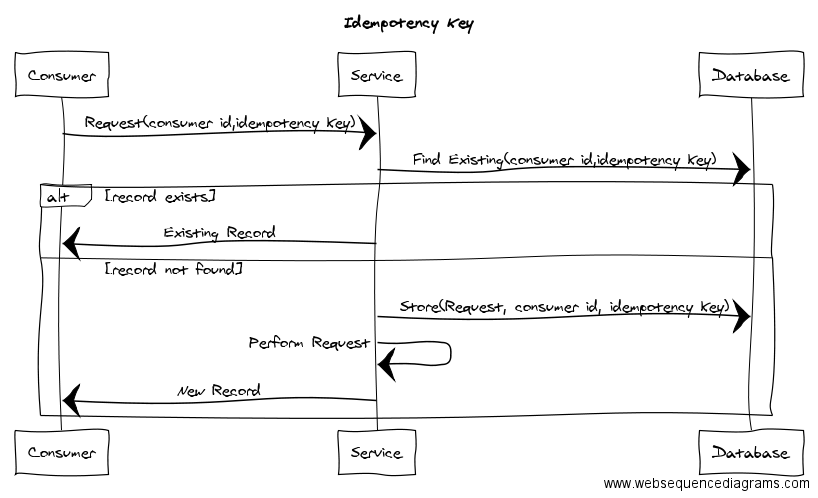
An idempotent operation ensures that making the same request multiple times produces the same result as making it once, with no additional side effects. For our lead intake, this translates to: the first request to create a lead succeeds; all subsequent identical requests are acknowledged but do not create duplicate leads.
To understand the core components required to build this pattern, let's review a professional guide on the topic.
Idempotency and exactly-once patterns in n8n: A practical guide
The article 'Idempotency and exactly-once patterns in n8n' clearly breaks down the theory and the practical building blocks for creating idempotent workflows. It provides the conceptual framework for our task.
Read the sections 'What do we mean by idempotency and exactly-once in n8n?', 'Core building blocks...', and the 'Example: Exactly-once contact sync...'. Focus on these four components: Stable idempotency keys: What makes a good key? Persistent deduplication store: Why is it necessary? Conditional logic: The 'check & branch' pattern. The simplified pattern example: See how these pieces fit together.
The "check & branch" pattern described is the fundamental logic we will implement. This sequence diagram visualizes that exact flow:
2. The Deduplication Store: n8n Data Tables
The idempotency pattern requires a "persistent deduplication store" to track the keys of processed requests. While you could use a Google Sheet for this, it introduces network latency and is not designed for fast lookups. A more professional and performant solution, especially for internal system functions, is to use n8n's native Data Tables.
Think of Data Tables as a fast, internal database built directly into n8n. Using them for our deduplication store keeps the system self-contained and highly efficient.
n8n Just Killed Google Sheets (And It's WAY Faster)
The video 'n8n Just Killed Google Sheets' provides a rapid, technical introduction to n8n Data Tables. It will show you how to create tables and use the essential node operations.
Watch the following segments to get up to speed: (00:39 - 02:24): Understand where to find Data Tables and the available CRUD (Create, Read, Update, Delete) operations in the n8n node. (02:24 - 06:11): Pay attention to the process of creating columns and mapping data. Note the importance of data types (string, number, etc.). (06:11 - 07:47): This is a key section on handling data type mismatches with a Set node, a common requirement for robust data handling.
3. Implementation: Building the Workflow
We will now construct the workflow, piece by piece, applying the principles of idempotency and robust validation.
Step 1: Prepare Your Data Structures
- Deduplication Store: In your n8n instance, create a new Data Table named
crm_intake_log. This will be your deduplication store. Define the following columns:idempotency_key(Type: String) - This will store the unique key for each lead intake request.lead_sheet_row(Type: Number) - This will store the row number of the created lead in your Google Sheet, linking the log to the actual data.status(Type: String) - e.g., 'PROCESSED'.processed_at(Type: Date) - The timestamp of processing.
- CRM Data: Create a new Google Sheet. Based on the
Leadsentity from the ERD you designed in the previous lesson, create the corresponding columns (e.g.,lead_id,first_name,last_name,email,company,status,created_at,updated_at).
Step 2: The Idempotent Workflow Logic
Here is the high-level architecture of your n8n workflow.
- Trigger (Webhook): Starts the workflow when it receives data from a simulated web form.
- Data Validation (Stage 1 - Format): A
Setnode to normalize the input. A classic example is trimming whitespace and converting the email to lowercase to ensure consistency.email->{{ $json.body.email.toLowerCase().trim() }}
- Generate Idempotency Key (Set): Create the stable key. A combination of the source and the normalized email is a robust choice.
idempotencyKey->webform:{{ $json.body.email }}
- Check for Duplicates (Data Table node): Use the
Get a Rowoperation on yourcrm_intake_logtable.- Lookup Column:
idempotency_key - Lookup Value:
{{ $json.idempotencyKey }} - Important: In the node's settings, ensure
Always Output Datais enabled so the workflow continues even if no match is found.
- Lookup Column:
- Branch (IF node): This is the core of the "check & branch" pattern.
- Condition: Check if the Data Table node returned an item. The condition would look for the existence of the
idempotency_keyfrom the previous step. - True Path (Duplicate): The key exists. The lead has been processed before. Immediately use a
Respond to Webhooknode to return a200 OKstatus. Do not proceed further. - False Path (New Lead): The key does not exist. Proceed to the next step.
- Condition: Check if the Data Table node returned an item. The condition would look for the existence of the
- Data Validation (Stage 2 - Business Rules): Now that you know it's a new lead, perform more business-specific validation. Use another
IFnode or a Code node. Is thefirst_namepresent? Does thephonenumber match a certain format? If validation fails, you could respond with an error or route to a manual review process. For now, we'll assume validation passes. - Create Lead Record (Google Sheets node): Use the
Append a Rowoperation to add the new lead's data to yourLeadssheet. - Record Processed Key (Data Table node): Use the
Insert a Rowoperation to add a record to yourcrm_intake_logtable. Map theidempotencyKey, therow_indexfrom the Google Sheets step, a status of 'PROCESSED', and the current timestamp. This step "closes the loop" on the idempotency check. - Set Initial State (Google Sheets node): Use the
Update a Rowoperation. Use therow_indexfrom the append step to find the row you just created. Set thestatuscolumn to the initial state from your state machine diagram (e.g., 'New'). - Respond (Respond to Webhook): Return a
201 Createdstatus to confirm the new lead was created.
While the following video discusses state machines for AI agents, the architectural pattern of using an external data table to track state, validate input, and control workflow progression is identical to what we are building.
The KEY to Building Reliable AI Agents in n8n
The video 'The KEY to Building Reliable AI Agents in n8n' demonstrates a sophisticated state management pattern using data tables. This reinforces the professional standard we are aiming for.
Focus on the concepts in these sections, translating 'AI agent state' to 'lead intake state': (13:39 - 19:48): Observe how a data table is used to define steps and store the current state for a given session. This is analogous to our crm_intake_log tracking processed leads. (19:48 - 24:08): See how the workflow validates input, updates the data table upon success, and then checks if more steps are available. This mirrors our process of validating a lead, creating it in Google Sheets, and then logging it in the deduplication table.
Practical Task: Implement the Intake System
You are now cleared to build. Your task is to implement the idempotent lead intake system for "Momentum Digital" as described above.
Deliverables
- Workflow JSON: The exported JSON file of your completed n8n workflow.
- Loom Walkthrough (max 5 minutes): Record a video where you:
- Briefly explain the workflow's architecture, highlighting the idempotency check.
- Demonstrate it live: Use a tool like Postman or n8n's "Copy URL" on the webhook to send a test lead payload. Show the new row appearing in Google Sheets and the new log entry in your Data Table.
- Prove deduplication: Send the exact same payload a second time. Show that no new row is added to Google Sheets and explain how the
IFnode correctly routed the execution down the "duplicate" path.
Evaluation Criteria
- Idempotency: The workflow must correctly identify and reject duplicate requests based on the idempotency key.
- Data Integrity: A new, unique lead must be successfully added to the Google Sheet and logged in the Data Table.
- State Management: The status of the newly created lead in Google Sheets must be correctly set to the initial state from your state machine diagram.
- Robustness: The workflow uses appropriate validation and normalization steps (e.g., lowercase email).
- Clarity: The Loom walkthrough clearly and concisely explains the system's logic and proves its functionality.
Conclusion
You have now implemented a system that is fundamentally more reliable than a simple "form-to-sheet" automation. By implementing an idempotent intake workflow, you've protected the CRM from data corruption at its most vulnerable point: data entry. This pattern is a cornerstone of professional automation engineering and is directly applicable to countless use cases, from processing payments to syncing inventory.
Key Takeaways:
- Idempotency is not optional for production systems that interact with the outside world.
- The
Generate Key -> Check Store -> Branch -> Process & Recordpattern is a universal solution for achieving idempotency. - n8n Data Tables are a superior, performant choice for internal state management and logging compared to external services like Google Sheets.
- Robustness is achieved through multi-stage validation: first checking data format and then applying business rules.
In the next lesson, we will bring your state machine diagram to life. Now that leads can enter the system cleanly, we will automate their pipeline stage transitions based on event-driven triggers, such as a lead replying to an email or booking a meeting.