Introduction
Welcome to your second lesson. In our previous session, you learned about the "nouns" of Python programming: variables and data types, which allow you to store and label information. Now, it's time to learn about the "verbs"—the actions you can perform on that data. This is where your journey toward building complex, intelligent systems truly begins, as all computation, from simple calculations to advanced AI, is built upon these fundamental operations.
Brief Recap:
Last time, we covered how to assign values to variables and explored Python's four basic data types: int, float, str, and bool. You learned that Python is dynamically typed and that variables are references to objects in memory.
This Lesson's Goal:
Today, we will focus on operators. By the end of this 60-minute lesson, you will be able to write arithmetic and comparison expressions using Python's operators. Specifically, you will learn to:
- Perform calculations using arithmetic operators (
+,-,*,/,//,%,**). - Make logical comparisons between values using comparison operators (
==,!=,<,>,<=,>=). - Understand operator precedence to control the order of operations.
Understanding Operators and Expressions
At its core, an operator is a symbol that tells the computer to perform a specific mathematical or logical manipulation. The values that an operator acts upon are called operands.
For example, in the expression 5 + 6, the + is the operator, and 5 and 6 are the operands.
Let's begin with a short video that provides a clear, theoretical definition of these terms.
Arithmetic Operators in Python
Watch this brief clip from the video 'Arithmetic Operators in Python' by Neso Academy. It provides a formal definition of operators and operands, which is a great starting point for our theory-first approach.
Watch from 00:27 to 01:20. Focus on understanding the distinction between an operator (the symbol for the action) and an operand (the value being acted upon).
Now that you have the basic terminology, let's explore the first major category of operators.
Arithmetic Operators: The Tools for Calculation
Arithmetic operators allow you to perform mathematical calculations. Since you'll be working towards AI and complex systems, a solid grasp of these is essential for everything from simple data manipulation to implementing the mathematical formulas behind machine learning algorithms.
Python supports the following arithmetic operators:
| Operator | Name | Description |
|---|---|---|
+ |
Addition | Adds two operands |
- |
Subtraction | Subtracts the right operand from the left |
* |
Multiplication | Multiplies two operands |
/ |
Division | Divides the left operand by the right; the result is always a float |
// |
Floor Division | Divides and returns the largest whole number less than or equal to the result (discards the fractional part) |
% |
Modulo | Returns the remainder of a division |
** |
Exponentiation | Raises the left operand to the power of the right operand |
To get a comprehensive understanding of how each of these works, please read the following section from a detailed article on Real Python.
Operators and Expressions in Python
This reading from 'Operators and Expressions in Python' on Real Python provides an in-depth look at each arithmetic operator with clear examples. It's a great resource for building a solid theoretical foundation.
Read the section titled 'Arithmetic Operators and Expressions in Python'. Pay special attention to the distinction between the division operator (/), which always produces a float, and the floor division operator (//).
Comparison Operators: The Basis of Logic
While arithmetic operators are for calculation, comparison (or relational) operators are for decision-making. They compare two values and produce a Boolean result: True or False. This is the foundation of logic in your programs, allowing them to react differently based on conditions.

The main comparison operators are:
| Operator | Name | Example |
|---|---|---|
== |
Equal to | x == y |
!= |
Not equal to | x != y |
> |
Greater than | x > y |
< |
Less than | x < y |
>= |
Greater than or equal to | x >= y |
<= |
Less than or equal to | x <= y |
Now, let's watch a video that demonstrates these operators in action.
#11 Python Tutorial for Beginners | Operators in Python
This segment from the Telusko video '#11 Python Tutorial for Beginners | Operators in Python' explains relational operators, which is another name for comparison operators. The presenter provides clear, live-coded examples.
Watch from 04:03 to 06:50. Notice how every expression with a comparison operator evaluates to either True or False, linking back to the bool data type from our last lesson.
An Important Note on Comparing Floats
A crucial theoretical point: due to the way floating-point numbers are stored in computer memory, using the == operator for exact equality can be unreliable. It is better practice to check if two floats are "close enough" to each other. We will revisit this advanced topic later, but it's an important concept to be aware of. The Real Python article you read earlier touches on this in its section on comparing floating-point values.
Controlling the Flow: Operator Precedence and Augmented Assignment
What happens when you combine multiple operators in one expression, like 10 + 5 * 2? Does Python add first, or multiply? The order is determined by operator precedence.
Additionally, Python offers a convenient shorthand called augmented assignment for modifying a variable's value (e.g., incrementing a counter).
Let's return to the Real Python article to understand these two important concepts.
Operators and Expressions in Python
We'll now read two more sections from the 'Operators and Expressions in Python' article. The first covers the rules of precedence, and the second introduces a clean, professional way to write self-updating expressions.
First, read the section 'Operator Precedence in Python'. This is a critical concept. Note that exponentiation (**) has the highest precedence among arithmetic operators, followed by multiplication/division, and then addition/subtraction. After that, read the section 'Augmented Assignment Operators and Expressions' to learn about shorthands like += and -=.
Your Turn: Applying Operators
Now, let's put theory into practice. Imagine you are working on a simple physics simulation. Your task is to calculate the final velocity of an object and check if it has exceeded a safety limit.
Hands-On Exercise:
In your Python environment, write a script that does the following:
-
Create the following variables:
initial_velocity_mps= 10 (velocity in meters per second)acceleration_mps2= 2.5 (acceleration in m/s²)time_sec= 5 (time in seconds)speed_limit_kph= 50 (speed limit in kilometers per hour)
-
Calculate Final Velocity: Using the formula , calculate the final velocity in meters per second and store it in a variable named
final_velocity_mps. -
Convert to KPH: Convert the final velocity from m/s to km/h and store it in a variable named
final_velocity_kph.- Hint: To convert m/s to km/h, multiply by 3.6.
-
Perform a Safety Check: Use a comparison operator to check if
final_velocity_kphis greater thanspeed_limit_kph. Store theTrue/Falseresult in a variable calledis_overspeeding. -
Print the results: Use the
print()function to display the values offinal_velocity_kphandis_overspeeding.
Example Code Structure:
# 1. Define initial variables
initial_velocity_mps = 10


# ... define other variables


# 2. Calculate final velocity in m/s
final_velocity_mps = initial_velocity_mps + acceleration_mps2 * time_sec


# 3. Convert to km/h
# ... your code here


# 4. Perform safety check
# ... your code here


# 5. Print results
print("Final Velocity (km/h):", final_velocity_kph)
print("Exceeded Speed Limit:", is_overspeeding)
After running your code, check if your output matches this:
Final Velocity (km/h): 81.0
Exceeded Speed Limit: True
This exercise validates that you can use arithmetic operators in the correct order of precedence and then use comparison operators to make a logical determination.
Conclusion
In this lesson, you've added the essential "verbs" of programming to your toolkit. You can now not only store data but also perform calculations and make comparisons with it.
Key Takeaways:
- Arithmetic Operators (
+,-,*,/,//,%,**) are used for mathematical calculations. - Comparison Operators (
==,!=,>,<, etc.) are used to compare values and result in aTrueorFalseboolean value, forming the basis of program logic. - Operator Precedence dictates the order of operations in complex expressions, which can be overridden with parentheses
(). - Augmented Assignment operators like
+=provide a concise way to update a variable's value.
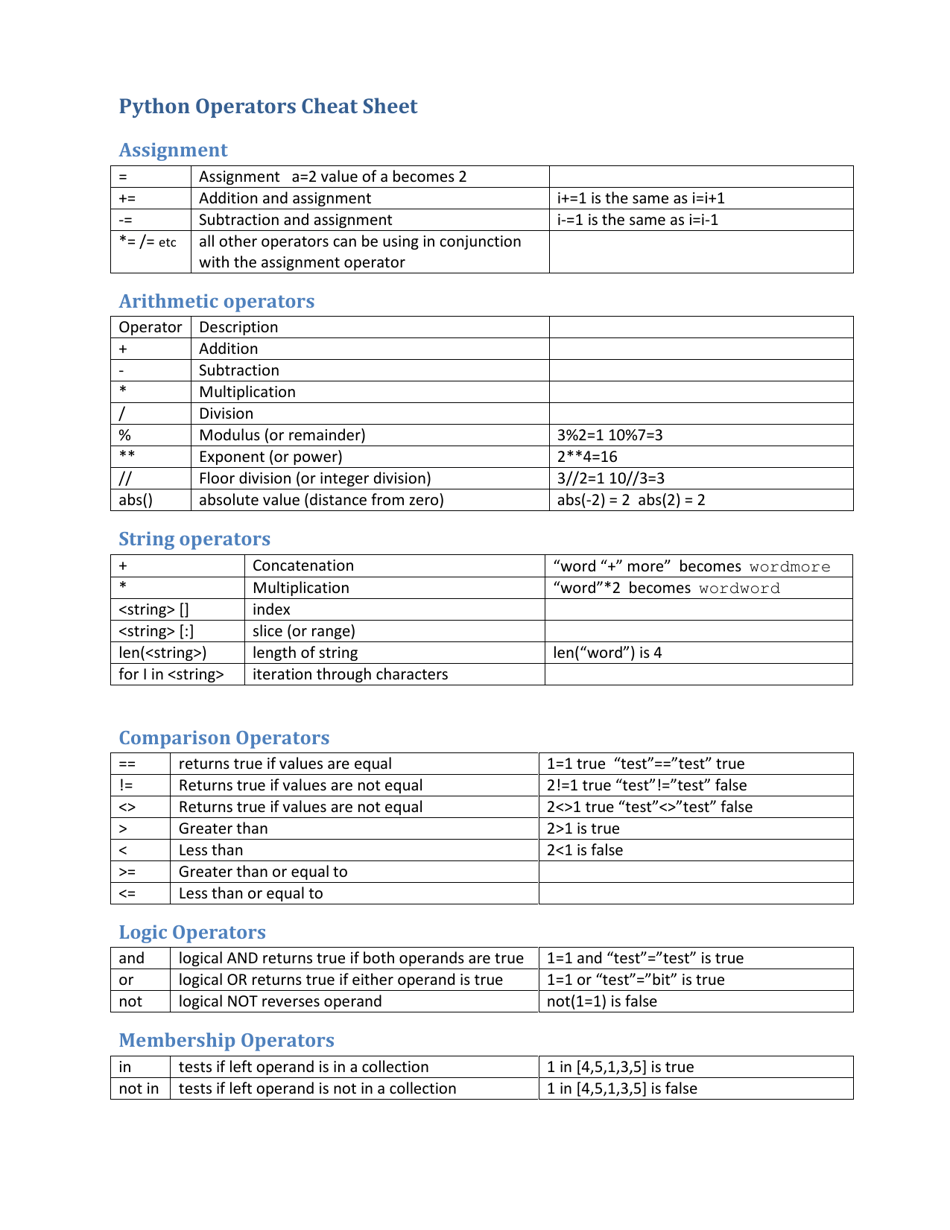
Here is a helpful cheat sheet that summarizes the operators we've discussed today.
Preview of the Next Lesson:
So far, you've written code as a linear sequence of commands. To build sophisticated applications, you'll need a way to organize and reuse your code. In the next lesson, we will cover functions. You will learn how to define your own reusable blocks of code that can accept inputs (parameters) and produce outputs (return values), a crucial step towards building modular and powerful programs.