Hello! Welcome to the final lesson in our first module on the foundations of word embeddings.
In our previous lessons, we've built a solid conceptual foundation. We started by understanding why dense vectors are superior to one-hot encoding, delved into the mechanics of Word2Vec and GloVe, and explored how fastText uses subword information. You can now confidently compare the training philosophies and unique strengths of these pivotal models.
Today, we transition from theory to practice. This lesson is all about rolling up our sleeves and working with these embeddings. Our goal is to load pre-trained models and use them to perform the very tasks we've been discussing: calculating word similarity and solving analogies. By the end of this lesson, you'll have the practical skills to leverage these powerful, pre-trained resources in your own projects. This will capstone our study of "static" embeddings and prepare us for the more advanced models to come.
How Do We Measure "Similarity"?
We've often used the terms "close" or "similar" to describe words in an embedding space. But how is this actually calculated? When we represent words as vectors, we can use mathematical distance or similarity measures to quantify their relationship.
While several metrics exist, such as Euclidean distance, the standard for NLP tasks is Cosine Similarity.
Ultimate Guide To Text Similarity With Python
This article provides an excellent introduction to similarity and compares different metrics.
First, read the brief introductory section on similarity. Then, in the "Similarity Measures" section, skip ahead and read the subsections on Euclidean distance and, more importantly, Cosine Similarity. Finally, read the summary on which metric to use.
The key takeaway is that cosine similarity measures the angle between two vectors, not their magnitude. This is crucial for text. For instance, a very frequent word might have a vector with a larger magnitude than a rare word, but we care more about their semantic direction. Cosine similarity captures this orientation, telling us if two words are used in similar contexts, regardless of their frequency. It conveniently returns a score between -1 and 1 (though typically 0 to 1 with non-negative embeddings), where 1 means identical orientation.
Putting Embeddings to Work with Gensim
Training your own embeddings from scratch requires a massive text corpus and significant computational power. Fortunately, we can stand on the shoulders of giants by using pre-trained models. These are embeddings that have already been trained on huge datasets (like Google News or Wikipedia) and are available for download.
A fantastic library for this is Gensim. It's a robust, open-source NLP toolkit that makes loading and manipulating word embeddings straightforward.
The following video from the "codebasics" channel is an excellent practical guide to using Gensim for exactly what we want to do. We'll walk through it step-by-step.
Word vectors in Gensim overview: NLP Tutorial For Beginners - S2 E10
This video provides a great, hands-on introduction to loading and exploring pre-trained word vectors in Gensim.
First, let's watch the beginning section that shows how to install Gensim and load a pre-trained model using its downloader API. Watch from the installation instructions up to where the model is loaded.
As the video demonstrates, Gensim's downloader API makes it easy to fetch popular models. The word2vec-google-news-300 model is a classic: it was trained on a 100-billion-word Google News dataset and represents words as 300-dimensional vectors.
Calculating Similarity and Finding Neighbors
Now that we have a model loaded, let's use it.
Word vectors in Gensim overview: NLP Tutorial For Beginners - S2 E10
Let's continue with the same video to see how to perform basic similarity operations.
Please watch the segment from "now it downloaded this model". Pay close attention to the explanation of why antonyms like "good" and "bad" can have high similarity scores.
This is a critical concept. In the context of word embeddings, "similarity" does not mean "synonymy." It means the words appear in similar contexts.
model.similarity('word1', 'word2'): This gives you the cosine similarity score between two words. For example,model.similarity('great', 'good')will be high.model.most_similar('word'): This returns a list of the most similar words. As you saw, the words most similar to "dog" include not only "dogs" and "puppy" but also "cat," because they are often used in the same sentence structures ("I love my ___").
Vector Arithmetic and Word Analogies
In a previous lesson, we discussed how vector arithmetic can capture analogies. Let's see this incredible property in action.
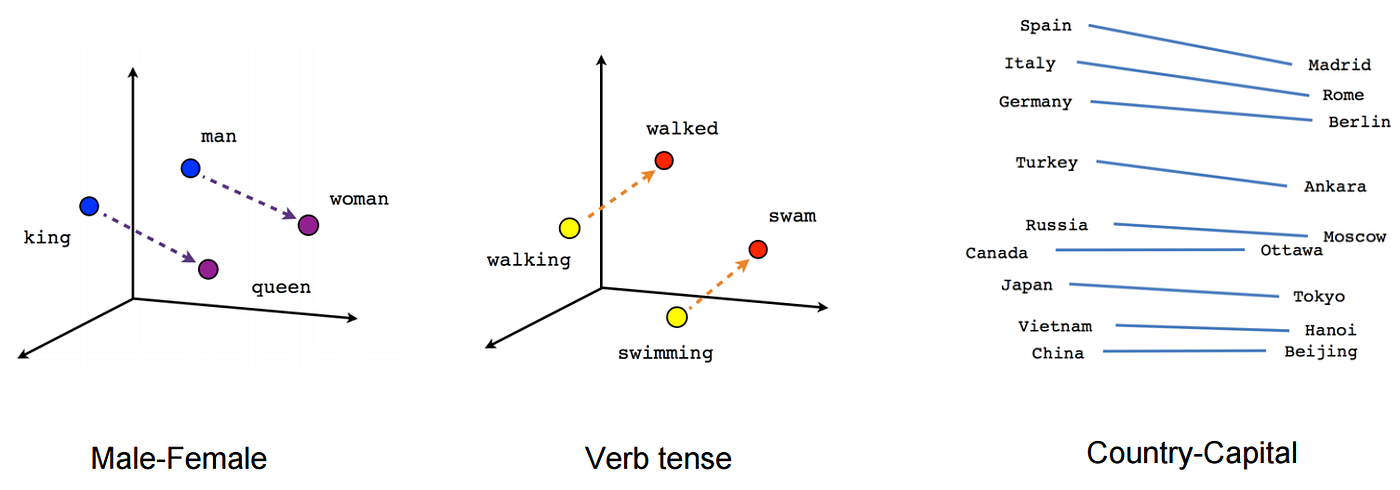
Gensim's most_similar function has positive and negative arguments that let us perform this vector math easily.
Word vectors in Gensim overview: NLP Tutorial For Beginners - S2 E10
The next part of the video demonstrates this vector arithmetic.
Watch the section from "Now you can do mathematics with this". The video shows two classic examples: king - man + woman ≈ queen and France - Paris + Berlin ≈ Germany.
The syntax for king - man + woman is:model.most_similar(positive=['king', 'woman'], negative=['man'])
This powerful feature confirms that the geometric structure of the embedding space truly encodes complex linguistic relationships.
Gensim also offers other handy utilities, like model.doesnt_match(), which can find the outlier in a list of words—a fun way to test the model's "understanding."
Loading a GloVe Model
While the Gensim downloader is convenient, you'll often download pre-trained models directly from their sources, such as Stanford's GloVe page. These files might be in a different format. Loading a GloVe model, for instance, requires a small conversion step.
How to Develop Word Embeddings in Python with Gensim
This article from Machine Learning Mastery provides clear code snippets for loading different embedding types.
Please read the section titled Load Stanford's GloVe Embedding. This demonstrates the two-step process: Use the glove2word2vec script to convert the format. Load the converted file using KeyedVectors.load_word2vec_format().
This is a common practical step in an NLP workflow. Once the GloVe model is loaded, you can use all the same functions (similarity, most_similar, etc.) that we used for the Word2Vec model.
The same principles apply to loading pre-trained fastText models, which are also readily available. As we discussed, their unique advantage is handling out-of-vocabulary (OOV) words by building a vector from their character n-grams. The Gensim wrapper for fastText allows you to get vectors for words that weren't even in the training data, a feat impossible for Word2Vec or GloVe.
From Words to Sentences: A First Step
So far, we've focused on individual words. But your ultimate goal involves understanding entire sentences and documents for tasks like RAG. How can we get a vector for a whole sentence?
The most basic approach is to simply average the word vectors of all the words in the sentence.
Ultimate Guide To Text Similarity With Python
Let's return to the "Ultimate Guide" article to see a practical implementation of this averaging technique.
Read the section on Word2Vec, focusing on the part labeled Implementation. Notice how it uses the spaCy library (which uses pre-trained vectors internally) and the .vector attribute of a Doc object. This Doc.vector is, by default, the average of its token vectors.
While this method is simple and provides a decent baseline, it has significant flaws:
- It completely disregards word order (
The dog chased the catandThe cat chased the dogmight have identical vectors). - It treats all words equally, whereas some words are more important to the sentence's meaning than others.
- It's a "bag-of-vectors" approach, losing all syntactic information.
This limitation is the perfect motivation for what comes next.
Conclusion
Congratulations on completing the first module! You've gone from the basic concept of embeddings to the practical application of pre-trained models.
Here are the key takeaways from today's lesson:
- Cosine similarity is the standard metric for measuring the similarity between word vectors because it is sensitive to orientation, not magnitude.
- Libraries like Gensim make it easy to download and use powerful pre-trained Word2Vec, GloVe, and fastText models.
- You can now programmatically find similar words, calculate similarity scores, and solve word analogies using vector arithmetic.
- A simple but limited method for representing a sentence is to average its word vectors.
The major limitation of everything we've seen so far is that these are static embeddings. The word "bank" has the same vector whether you're talking about a river bank or a financial bank. The simple averaging of these static vectors for sentence representation is also deeply flawed.
This is where our journey heads next. In the next module, we will begin exploring models that generate contextual embeddings—vectors that change based on the surrounding words. Our first stop will be Recurrent Neural Networks (RNNs), an architecture specifically designed to process sequential data like text. This is the first crucial step on the path toward the Transformer models that power modern LLMs.