Hello! Welcome to the final lesson in our backtracking module.
In the previous lesson on the N-Queens problem, we saw how to apply our choose, explore, unchoose backtracking template to a grid-based puzzle with complex constraints. Today, we'll tackle another classic problem that is a favorite in technical interviews: Sudoku.
The goal of this lesson is to implement a backtracking algorithm to solve a Sudoku puzzle. You'll find that the underlying logic is remarkably similar to the N-Queens solver. We will systematically find empty cells, try to place valid numbers, and backtrack when our choices lead to a dead end.
1. Understanding the Sudoku Puzzle
First, a quick refresher on the rules of Sudoku:
- You have a 9x9 grid, partially filled with numbers.
- The goal is to fill the empty cells.
- Each row must contain the digits 1-9 exactly once.
- Each column must contain the digits 1-9 exactly once.
- Each of the nine 3x3 subgrids (or "boxes") must contain the digits 1-9 exactly once.
In Java, we can represent the board with a 2D array, like int[9][9], where 0 represents an empty cell.
2. The Backtracking Strategy for Sudoku
Our strategy mirrors the one we used for N-Queens. We will scan the board to find an empty cell and then try to fill it with a valid number.
- Find: Locate the next empty cell (e.g., a cell with the value
0). If there are no empty cells, congratulations, the puzzle is solved! - Choose: For that empty cell, try placing a number from 1 to 9.
- Check: Before placing the number, check if it's a valid placement. Does this number already exist in the current row, column, or 3x3 subgrid?
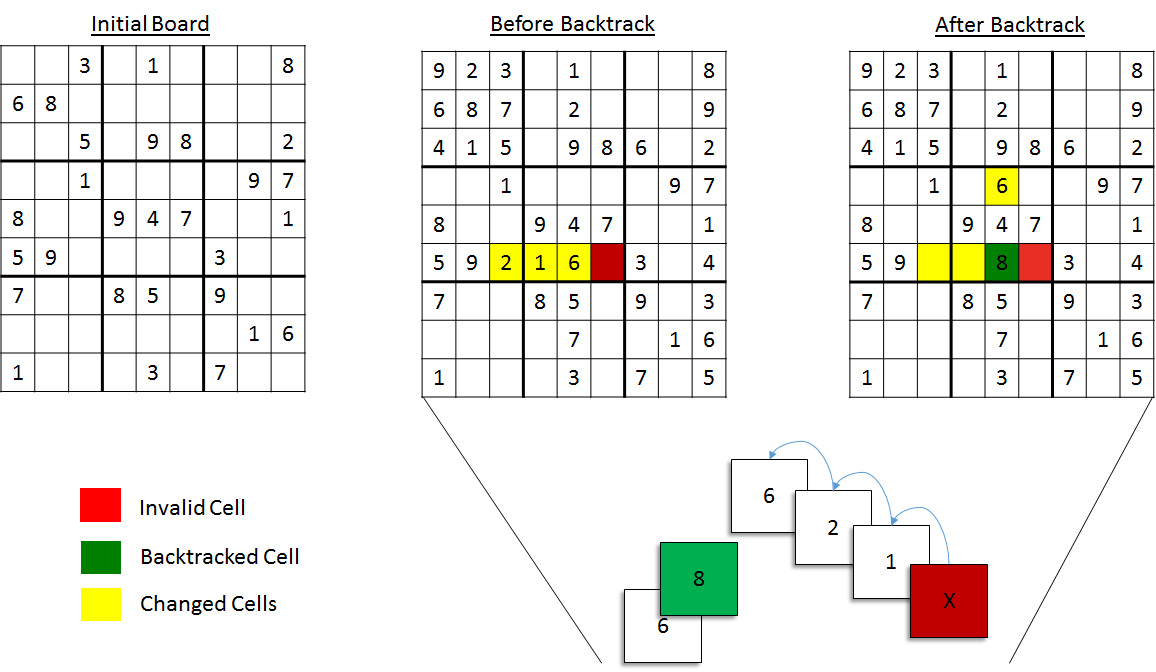
- Explore: If the placement is valid, place the number and recursively call the solver to continue solving the rest of the board.
- Unchoose (Backtrack): If the recursive call returns
false(meaning the path we took was a dead end), we must undo our choice. We reset the cell back to0and try the next number (from 1 to 9).
If we try all numbers from 1 to 9 for a cell and none of them lead to a solution, we return false from our function, which tells the previous recursive call that its choice was wrong, triggering it to backtrack as well.
This image provides a great visual for the backtracking process:
The following video provides an excellent conceptual overview of this exact algorithm.
Create a Sudoku Solver In Java In 20 Minutes - Full Tutorial
This segment from 'Create a Sudoku Solver In Java In 20 Minutes' by Coding with John clearly explains how the recursive, backtracking algorithm will work.
Please watch from 08:15 to 10:24. Pay close attention to the explanation of trying a number, moving on, and what happens when you hit a dead end and need to backtrack.
3. Implementing the Solver in Java
Let's build the solution step-by-step. The key is to first create helper methods to check the Sudoku rules, and then use them in our main recursive solver. The video you just watched a clip from walks through the entire process.
Part 1: Setup and Helper Functions
First, we need to set up our board and create the essential helper methods that check if a number can be placed in a specific cell. These helpers are the foundation of our isValid check.
isNumberInRow()isNumberInColumn()isNumberInBox()
The most interesting of these is isNumberInBox(). How do you determine which 3x3 box a given (row, col) cell belongs to? A simple integer division trick works perfectly. To find the top-left corner of any box:
boxStartRow = (row / 3) * 3boxStartCol = (col / 3) * 3
For example, for cell (7, 5):
boxStartRow = (7 / 3) * 3 = 2 * 3 = 6boxStartCol = (5 / 3) * 3 = 1 * 3 = 3
The 3x3 box for cell(7, 5)starts at(6, 3).
The video below will guide you through creating the board and implementing these crucial helper methods.
Create a Sudoku Solver In Java In 20 Minutes - Full Tutorial
Let's continue with the 'Coding with John' video. This part covers setting up the board and writing the three rule-checking methods, plus a wrapper isValidPlacement method.
Watch from 00:27 to 08:15. Follow along to understand how the board is represented and how each of the validation methods is implemented. Make sure you understand the logic for finding the 3x3 box boundaries.
Test your understanding!
You are checking if you can place the number 5 at board[4][7]. The isNumberInBox() helper needs to find the top-left corner of the 3x3 box containing this cell. What are the coordinates of this top-left corner?
Show answer
The coordinates are (3, 6).
boxStartRow = (4 / 3) * 3 = 1 * 3 = 3boxStartCol = (7 / 3) * 3 = 2 * 3 = 6
The function will then iterate fromrow = 3to5andcol = 6to8to check for the number5.
Part 2: The Recursive solveBoard Method
Now that we have our validation logic, we can write the main recursive function that embodies the backtracking algorithm we discussed. This function will traverse the grid, find empty spots, and use our helpers to try placing numbers.
This is where the choose, explore, unchoose pattern comes to life.
Create a Sudoku Solver In Java In 20 Minutes - Full Tutorial
This final segment of the video implements the core solveBoard method, bringing everything together.
Watch from 10:24 to 15:59. This is the most important part of the lesson. Notice the nested loops to find an empty cell, the loop from 1-9 to try numbers, and especially the recursive call and the backtracking step (board[row][column] = 0;).
Full Java Code
Here is a complete Java implementation, combining the concepts from the video. It's structured slightly differently from the video (using a single recursive solve method that returns a boolean), which is a very common pattern for this problem.
public class SudokuSolver {

    private static final int GRID_SIZE = 9;

    public static void main(String[] args) {
        int[][] board = {
            {7, 0, 2, 0, 5, 0, 6, 0, 0},
            {0, 0, 0, 0, 0, 3, 0, 0, 0},
            {1, 0, 0, 0, 0, 9, 5, 0, 0},
            {8, 0, 0, 0, 0, 0, 0, 9, 0},
            {0, 4, 3, 0, 0, 0, 7, 5, 0},
            {0, 9, 0, 0, 0, 0, 0, 0, 8},
            {0, 0, 9, 7, 0, 0, 0, 0, 5},
            {0, 0, 0, 2, 0, 0, 0, 0, 0},
            {0, 0, 7, 0, 4, 0, 2, 0, 3}
        };

        if (solveBoard(board)) {
            System.out.println("Solved successfully!");
        } else {
            System.out.println("Unsolvable board :(");
        }
        printBoard(board);
    }

    // Helper methods for validation
    private static boolean isNumberInRow(int[][] board, int number, int row) {
        for (int i = 0; i < GRID_SIZE; i++) {
            if (board[row][i] == number) {
                return true;
            }
        }
        return false;
    }

    private static boolean isNumberInColumn(int[][] board, int number, int column) {
        for (int i = 0; i < GRID_SIZE; i++) {
            if (board[i][column] == number) {
                return true;
            }
        }
        return false;
    }

    private static boolean isNumberInBox(int[][] board, int number, int row, int column) {
        int localBoxRow = row - row % 3;
        int localBoxColumn = column - column % 3;

        for (int i = localBoxRow; i < localBoxRow + 3; i++) {
            for (int j = localBoxColumn; j < localBoxColumn + 3; j++) {
                if (board[i][j] == number) {
                    return true;
                }
            }
        }
        return false;
    }

    private static boolean isValidPlacement(int[][] board, int number, int row, int column) {
        return !isNumberInRow(board, number, row) &&
               !isNumberInColumn(board, number, column) &&
               !isNumberInBox(board, number, row, column);
    }

    // The main recursive solver
    private static boolean solveBoard(int[][] board) {
        for (int row = 0; row < GRID_SIZE; row++) {
            for (int column = 0; column < GRID_SIZE; column++) {
                if (board[row][column] == 0) { // Is the cell empty?
                    for (int numberToTry = 1; numberToTry <= GRID_SIZE; numberToTry++) {
                        if (isValidPlacement(board, numberToTry, row, column)) {
                            // 1. Choose
                            board[row][column] = numberToTry;

                            // 2. Explore
                            if (solveBoard(board)) {
                                return true; // Solution found
                            } else {
                                // 3. Unchoose (Backtrack)
                                board[row][column] = 0;
                            }
                        }
                    }
                    // If we tried all numbers and none worked, this path is a dead end.
                    return false;
                }
            }
        }
        // If we get here, the board is full and solved.
        return true;
    }

    // Helper to print the board
    private static void printBoard(int[][] board) {
        // Implementation similar to the video
    }
}
4. Complexity Analysis
Understanding the performance of your algorithm is key for interviews.
The article 'Sudoku in Java' from AlgoCademy provides a concise analysis of the time and space complexity.
Please read the 'Complexity Analysis' section. Note that their n*n refers to the number of empty cells, not the board size. A more standard notation is O(9^m) where m is the number of empty cells.
- Time Complexity: O(9m), where
mis the number of empty cells. In the worst-case scenario, for each of themempty cells, we might have to try up to 9 different numbers. This exponential complexity is typical for backtracking algorithms that explore a large search space. - Space Complexity: O(m) or O(N2). The primary space usage comes from the recursion call stack. The depth of the recursion is at most the number of empty cells,
m. Sincemcan be at most 81 (for a 9x9 board), the space complexity is often stated as O(N2) or simply O(1) in the context of a fixed-size 9x9 board.
Conclusion
You've now successfully applied backtracking to two major grid-based puzzles: N-Queens and Sudoku. This reinforces the power and flexibility of the choose, explore, unchoose pattern.
Key Takeaways:
- Sudoku can be modeled as a constraint satisfaction problem, making it a perfect fit for backtracking.
- The core of the algorithm involves finding an empty cell, trying valid numbers from 1 to 9, and recursively exploring the consequences of that choice.
- Helper functions for validating rows, columns, and 3x3 boxes are essential to keep the main solver logic clean.
- If a choice leads to a dead end, backtracking (un-choosing) is crucial to explore alternative solutions.
Preview of the Next Lesson:
With this lesson, we conclude our deep dive into backtracking. You are now equipped to handle a wide range of permutation, combination, and grid-based backtracking problems in your interviews.
In the next module, we will shift gears to another fundamental topic in computer science: Graphs. We'll start by learning the two most common ways to represent graphs in code: adjacency matrices and adjacency lists, setting the stage for exploring powerful graph traversal algorithms.