Introduction
In our last lesson, we mastered the for loop, your tool for repeating actions a specific number of times—like iterating through the last 20 bars. This is powerful, but what if you don't know how many times you need to repeat something? What if you need your program to "wait and watch" for a specific condition to be met? For example, you might want your bot to hold off on any new trades while an existing trade is open.
This is where our next tool, the while loop, comes in. This lesson will teach you how to create loops that continue to run as long as a given condition remains true. This shifts your coding ability from performing fixed-count tasks to creating dynamic, state-aware logic, which is fundamental for building responsive trading bots. By the end of this lesson, you will be able to implement a while loop to repeat code execution based on a live condition.
The while Loop: Repeating Based on a Condition
Unlike a for loop which is built around a counter, a while loop is simpler in its structure. It continuously executes a block of code as long as a specific logical expression evaluates to true.
The basic syntax is straightforward:
while (condition)
{
  // Code to be repeated goes here
}
The program checks the condition before each potential run. If it's true, the code inside the curly braces {} is executed. If it's false, the loop is skipped entirely, and the program moves on.
The following flowchart provides a clear visual of this logic. The program enters the loop, checks the condition, and if the answer is "Yes," it performs the action and loops back to check the condition again. If the answer is "No," it exits the loop and proceeds.
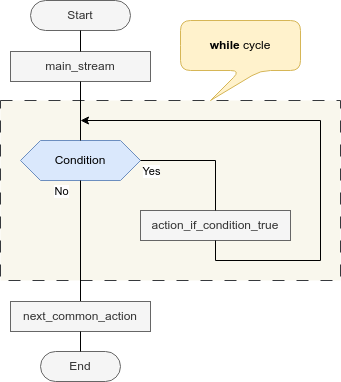
Let's start with a basic written explanation.
While loop - Programming fundamentals - MQL5 Programming for Traders
This section from the official MQL5 book provides the formal definition and syntax for the while loop.
Read the introductory part, from the beginning down to the point explaining what happens if the condition is initially false. This reinforces the core principle.
A Simple Counter with a while Loop
The best way to understand the while loop is to see it in action. Let's build a simple counter, similar to what we did with the for loop, but using while instead.
The video below, "LEARN MQL5 TUTORIAL BASICS - 8 HOW TO USE THE WHILE LOOP," will walk you through creating a simple script that uses a while loop. The example in the video is slightly different (it uses a large number for a delay), but the core principles are identical.
LEARN MQL5 TUTORIAL BASICS - 8 HOW TO USE THE WHILE LOOP
This video provides a clear, practical demonstration of writing a while loop from scratch in MetaEditor.
First, follow along with the presenter from this section to set up a new Expert Advisor file. Then, watch carefully from this part, where the presenter declares a counter variable and builds the while loop. Pay close attention to these three steps: Initialization: A variable (DelayCounter) is created before the loop starts. Condition: The while loop checks if this variable is less than a certain value. Update: The variable is incremented inside the loop.
The Critical Danger: Infinite Loops
With for loops, the iteration step is built into the syntax, so they usually terminate as planned. With while loops, you are responsible for ensuring the condition eventually becomes false. If you forget, you create an infinite loop.
An infinite loop is a loop that never ends. In MQL5, this will cause your script or Expert Advisor to freeze, stop responding, and consume all available processing power. It will not be able to process new ticks, manage trades, or do anything else. Learning to avoid this is one of the most important lessons in programming.
The cause is almost always the same: the variable being checked in the loop's condition is never changed inside the loop body.
The video you just started watching has an excellent demonstration of exactly what happens when you make this mistake.
LEARN MQL5 TUTORIAL BASICS - 8 HOW TO USE THE WHILE LOOP
Now, watch this critical segment of the video where the presenter intentionally creates an infinite loop.
Watch from this timestamp. Notice how the Strategy Tester freezes completely when the line that increments the counter is moved outside the loop. The while condition DelayCounter < 500000 is always true, so the loop never stops.
This is the golden rule of while loops: Something inside the loop must work towards making the condition false.
The MQL5 documentation also warns about a more subtle cause of infinite loops, particularly when counting down.
While loop - Programming fundamentals - MQL5 Programming for Traders
This resource points out a specific pitfall related to data types.
Find the paragraph that begins with this text. It explains why using an unsigned integer (uint) in a countdown loop like while(--i >= 0) can cause an infinite loop. This is because a uint can't be negative; when it goes below 0, it "wraps around" to a very large positive number, so the condition i >= 0 remains true forever.
Practical Exercise: Build and Break a while Loop
Let's apply this knowledge. We'll create a simple script that counts and then intentionally break it to see the effect of an infinite loop firsthand.
- Open MetaEditor and create a new script named
WhileTest. (Go toFile > New > MQL5 Program > Script). - Replace the default code with the following:
//+------------------------------------------------------------------+
//|                                                    WhileTest.mq5 |
//+------------------------------------------------------------------+


#property copyright "Your Name"
#property version   "1.00"

//--- This function runs when the script is started
void OnStart()
{
  Print("Start of script");

  int counter = 1;

  // --- YOUR TASK: Add a while loop here ---
  // It should print the value of 'counter' as long as it is less than 3 (i.e., 1 and 2)
  // Remember to increment the counter inside the loop!


  Print("Loop has finished");
  Alert("Loop has finished");
}
Your Tasks:
- Implement the Loop: In the space indicated, write a
whileloop that runs as long ascounteris less than 3. Inside the loop, usePrint(counter);and then increment the counter. - Compile and Run: Compile the code (F7). In MetaTrader 5, find the
WhileTestscript in the "Navigator" window under "Scripts". Drag it onto any chart. - Check the Output: Go to the "Experts" tab in the "Toolbox" window (Ctrl+T). If you did it correctly, the log should show "Start of script," then "1," then "2," and finally "Loop has finished." An alert box will also pop up. The output should look similar to the log in this image:
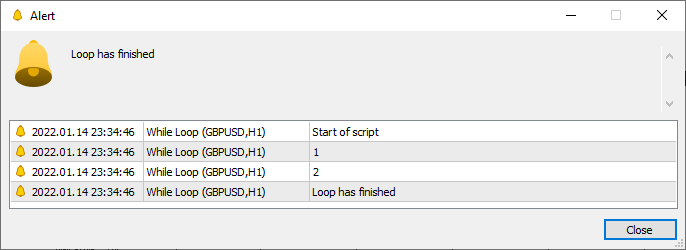
- Create an Infinite Loop: Now, comment out or delete the line inside your loop that increments the counter (
counter++;orcounter = counter + 1;). Compile the code again. Before you run it, be aware that MetaTrader might become unresponsive. Run the script. Notice how the "Loop has finished" message never appears and the platform freezes. You will likely need to close and restart MetaTrader 5. This experience, while disruptive, is the best way to understand the importance of loop termination.
Trading Application: while vs. if
So, when would you use a while loop in a trading bot? A common scenario is when you need to ensure an action is completed, but a for loop isn't suitable.
A fantastic, non-obvious example is opening multiple trades at once. Imagine your strategy requires you to open 5 positions immediately. If you use an if statement like if (PositionsTotal() < 5), it will only open one trade per tick. The OnTick() function will run, open one trade, and then finish. On the next tick, it will open another, and so on.
However, a while loop behaves differently. The while (PositionsTotal() < 5) loop will execute repeatedly within the same tick until 5 positions are open. It does not wait for the next tick.
This article provides a great walkthrough comparing these two behaviors.
MQL5 TUTORIAL - SIMPLE WHILE LOOP - MQL5 Tutorial
This tutorial demonstrates the powerful and immediate effect of a while loop inside the OnTick() function for trade execution.
Read through the article, focusing on the logic. Pay special attention to the section titled Result comparison. The author first uses an if statement to open trades one by one on subsequent ticks, then switches to a while loop, which opens all trades instantly at the same moment. This highlights a crucial difference in behavior for trading logic.
This ability to execute code repeatedly within a single event makes the while loop a tool for aggressive, rapid actions, but one that must be used with extreme care to avoid freezing your trading terminal.
Conclusion
In this lesson, you've added the while loop to your MQL5 toolkit. Unlike the for loop, which runs a set number of times, the while loop provides the flexibility to repeat actions based on a dynamic condition.
Key Takeaways:
- A
whileloop executes a block of code repeatedly as long as its condition istrue. - The condition is checked before each iteration. If the condition is false from the start, the loop will never run.
- The most critical aspect of a
whileloop is ensuring the condition will eventually becomefalse. Failure to do so results in an infinite loop, which will freeze your program. - In trading, a
whileloop insideOnTick()executes its entire cycle within a single tick, allowing for rapid-fire actions that anifstatement cannot perform.
You have now completed the "Logic and Control Flow" module. You can declare variables, perform operations, make decisions with if-else, and create loops with for and while. These are the absolute fundamental building blocks of any program.
In our next module, we will begin organizing our code more effectively. Instead of writing everything in one long sequence, we'll learn how to create reusable blocks of code called functions, starting with an exploration of the OnStart() event handler you've already been using.