Hello and welcome to your first lesson in MQL5 programming! We're kicking things off by getting a clear picture of the landscape. Your goal is to build trading bots, and this course is designed to get you there as directly as possible, starting from the ground up since this is your first programming language.
In this lesson, we will focus on understanding the three main types of programs you can create with MQL5: Scripts, Indicators, and Expert Advisors. Knowing what each one does is the essential first step, as it tells you which tool to use for which job. By the end of this lesson, you'll be able to describe the role of each program type and understand how they fit into the MetaTrader 5 platform.
The Building Blocks of MQL5 Automation
At its core, MQL5 is the language used to give instructions to the MetaTrader 5 trading platform. You can't build a trading bot without first understanding the different kinds of "bots" or programs you can create. Let's start with a quick overview from a practical guide.
Practical Beginner’s Guide to MQL5 Programming
This article provides a great, no-nonsense introduction to what MQL5 is for.
Read the section titled Why would someone need MQL5?. It clearly lists and describes the three main program types you can build. Pay close attention to the brief description of each one.
As you just read, MQL5 allows you to build three main things: Expert Advisors, Custom Indicators, and Scripts. You can see these categories right inside the MetaTrader 5 platform, in a panel called the "Navigator."
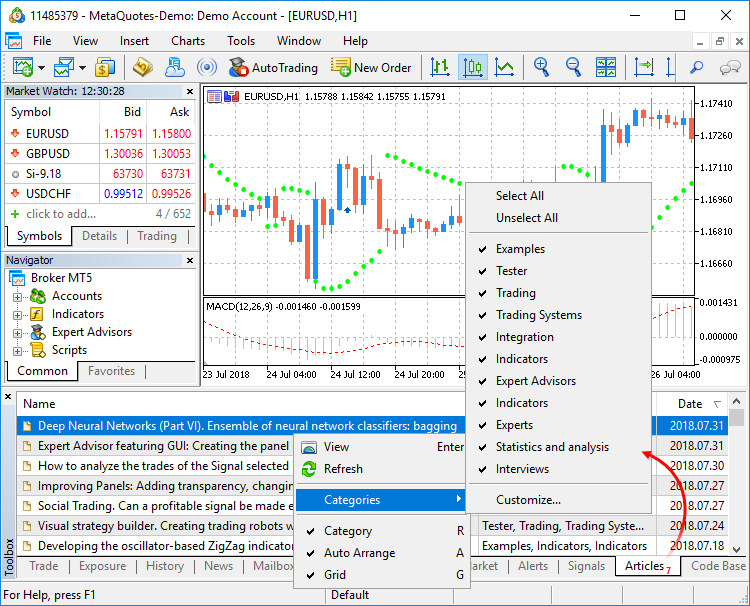
Now, let's explore what each of these does in more detail.
1. Scripts: The One-Time Taskmasters
A script is the simplest type of MQL5 program. Its defining characteristic is that it runs once and then stops. You execute it to perform a specific, one-time action.
Think of it as a utility tool. For example, you could write a script to:
- Close all of your open positions at once.
- Delete all the indicator lines you've drawn on a chart.
- Export the last 1000 bar prices to a file.
You trigger the script, it does its job, and it's done. It won't react to new price changes or run continuously in the background.
2. Indicators: The Visual Analysts
You are likely already familiar with indicators from a trading perspective. In MQL5, a custom indicator is a program you write to calculate values and display them on a chart.
Key characteristics of indicators are:
- They run continuously, updating with every new price tick that comes from the server.
- Their primary purpose is to provide visual information for analysis (e.g., drawing lines, arrows, or histograms).
- Crucially, indicators cannot place trades. They are purely for analysis.
A common example is a Moving Average. While MetaTrader has a built-in one, you could use MQL5 to create your own unique version—perhaps one that changes color when the market trend shifts.
3. Expert Advisors (EAs): The Trading Bots
This is the category you're most interested in. An Expert Advisor, or EA, is the MQL5 term for a fully automated trading bot. This is the program that will ultimately execute your trading strategy.
To make the connection perfectly clear, let's watch a short clip.
Beginner MQL5 Trading Bot Code - Moving Average Part 1 #algotrading #stockmarket
The presenter of this video makes a very important point for beginners.
Watch the clip from the beginning. The key takeaway here is the clarification that "Expert Advisor" and "trading bot" are used interchangeably in the world of MetaTrader.
So, whenever we talk about an EA, we are talking about your trading bot. The core features of an EA are:
- Like indicators, they run continuously on every price tick.
- They can analyze market data using prices, built-in indicators, or custom indicators.
- Most importantly, they can execute and manage trades automatically based on the rules you code into them.
This is where everything comes together: your analysis (from indicator logic) and your execution (trade functions) are combined into a single program that operates on its own.
Comparing the Program Types
The different behaviors—running once versus running continuously, trading versus not trading—are fundamental. A helpful article on the official MQL5 website provides a clear breakdown.
Master MQL5 from beginner to pro (Part I): Getting started ...
This article was written specifically for new programmers. It defines the program types and then summarizes their capabilities in a very useful table.
First, read the section Main types of MQL5 programs for another set of definitions. Then, carefully review Table 1 in the following section, Comparing the capabilities. This table is an excellent reference that highlights the key differences at a glance. Focus on rows like "Can trade" and "Executed on every tick."
Video Summary
To reinforce these concepts, let's watch a concise video that summarizes the roles of each program type.
How to add Indicators, Scripts & Expert Advisors on Metatrader 5 ( MT5)
This video offers a quick, visual summary of what we've just discussed.
Watch the following segments: The definition of an indicator from the start. The definition of a script at this point. The definition of an Expert Advisor from here. Finally, pay close attention to the final summary, which neatly wraps up the differences.
From Concept to Creation
Since your goal is to get to building bots quickly, it's useful to see what the very first step of creating an Expert Advisor looks like. When you start a new project in the MetaEditor (the programming environment for MQL5), you are presented with a choice.
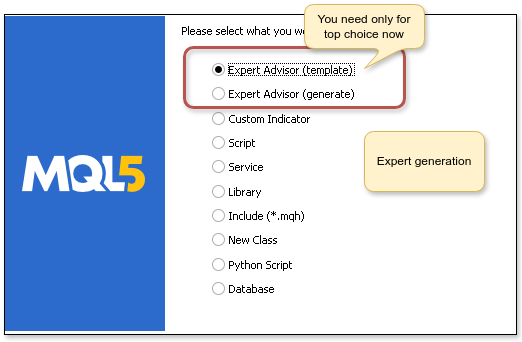
This is the starting point for every EA. You are telling the editor, "I am building a program that needs to run continuously and be able to trade." Choosing this option generates a basic code structure for you to build upon. We'll do exactly this in future lessons.
Conclusion
You've now taken the crucial first step. You know the "what" before you dive into the "how."
Key Takeaways:
- MQL5 allows you to create three main types of programs: Scripts, Indicators, and Expert Advisors.
- Scripts are for single-use tasks. They run once and stop.
- Indicators are for analysis. They run continuously to draw on charts but cannot trade.
- Expert Advisors (EAs) are trading bots. They run continuously and can automatically execute and manage trades.
- The primary difference lies in their purpose (analysis vs. trading) and execution model (run-once vs. continuous).
In our next lesson, we will begin writing our very first lines of code. We'll start with the most fundamental building blocks of any programming language: variables. You'll learn how to create containers to store numbers and text, which is the foundation for expressing any trading rule.