Introduction
In our last lesson, we delved into the low-level mechanics of memory management, comparing how TypeScript and Python handle the stack and the heap. This gave us a foundational understanding of how a language's design choices can impact its performance and behavior. Today, we're zooming out from the internals to look at the broader landscape that surrounds a programming language.
This lesson addresses the learning outcome: Evaluate a language's ecosystem based on its package manager, build tooling, and standard library. A language is far more than just its syntax and runtime; its power and utility come from the tools and libraries that support it. For you, as someone aiming to become language-agnostic and effective across the full stack, understanding a language's ecosystem is the key to becoming productive quickly. It's the answer to your question about what's missing beyond syntax—it’s about knowing how to find, use, and assemble the building blocks to create a real application.
We will explore the three pillars of a language's ecosystem and compare the philosophies that shape them, using Python, Node.js, and C#/.NET as our primary examples.
The Three Pillars of a Language Ecosystem
When you approach a new language, you're also entering its ecosystem. Think of it as a workshop. To build something, you need to know three things:
- What tools are already on the workbench? This is the Standard Library. It's the set of pre-written, reusable code for common tasks (like file access or networking) that is bundled with the language itself.
- How do I order specialized tools? This is the Package Manager. It's a tool that lets you find, download, and manage code written by other people (third-party libraries or packages) to add functionality you need. You're already very familiar with this concept through
npmand the Node.js ecosystem. - How do I assemble the final product? This is the Build Tooling. It’s the set of tools that compile, bundle, and package your source code into a runnable application or a distributable library. Your experience with the Angular CLI (
ng build) is a perfect example of this.
A language's philosophy on one pillar deeply influences the others. Let's start with the foundation: the standard library.
The Standard Library: Two Competing Philosophies
The design of a standard library often falls into one of two camps: "minimalist" or "batteries-included." This choice has a massive impact on how you work with the language. The following article from Grokipedia provides an excellent overview of this concept.
Comparison of programming languages' standard libraries — Grokipedia
This reading will introduce you to what a standard library is, why it's important, and the two dominant design philosophies that govern its scope.
First, read the introduction to get a high-level overview. Next, jump to the section "Why is the standard library important?" and read that short section (Why it's important) to understand its role in developer productivity and project stability. Finally, read the two subsections under "Design Philosophies": Minimalist approach and Batteries-included philosophy. Pay close attention to the trade-offs described for each approach.
As you've just read, the "batteries-included" approach, famously championed by Python, aims to provide a rich set of tools out of the box to make developers productive immediately. The minimalist approach, seen in languages like Rust, keeps the core small and stable, relying on a strong package ecosystem to provide additional functionality.
Comparing the Ecosystems: Python, Node.js, and .NET
Let's see how this plays out in the languages we're focusing on. You've worked extensively in the Node.js world, which gives you a solid reference point.
| Language | Standard Library Philosophy | Key Built-ins (Examples) | Package Manager | Build Tooling |
|---|---|---|---|---|
| Python | Batteries-Included | json, http.server, sqlite3, csv, asyncio |
pip |
(Integrated into workflows; no single dominant build tool like in JS) |
| Node.js (TS) | Minimal (ECMAScript) + Rich Runtime | fs, http, path, crypto |
npm / yarn |
tsc + Bundlers (Webpack, Vite, esbuild) |
| C# (.NET) | Batteries-Included (Enterprise-grade) | System.Net.Http, System.Text.Json, LINQ |
NuGet |
dotnet CLI (MSBuild engine) |
Let's break this down.
Python: True to its "batteries-included" motto, you can build a simple web server, parse a CSV file, or interact with a SQLite database using only the standard library. This is fantastic for scripting and rapid prototyping. When you need more, like the FastAPI framework we'll use later, you turn to pip, its package manager, to install it from the Python Package Index (PyPI).
Node.js/TypeScript: The base language (ECMAScript) has a very minimal standard library. However, the Node.js runtime adds a rich set of modules for server-side development (fs, http, etc.), which you've used. But for almost any non-trivial application, you immediately reach for npm to install packages like express, lodash, or a database driver. Your frontend work with Angular further highlights this, relying on npm for a vast array of dependencies. The build tooling is also a composite system: tsc transpiles TypeScript to JavaScript, and then a bundler like Webpack or Vite takes over to optimize and package it for the browser.
C#/.NET: Like Python, .NET is firmly in the "batteries-included" camp, but with an enterprise focus. The .NET libraries (historically called the Base Class Library) are vast and cover everything from high-performance networking (HttpClient) to powerful data querying (LINQ) and robust JSON handling. For third-party packages, developers use the NuGet package manager. The entire process is orchestrated by the powerful dotnet command-line interface (CLI), which handles creating, building, testing, and running projects.
The Grokipedia article you read from earlier has a section that groups languages by these philosophies. It provides more detail on the specific strengths of each.
Comparison of programming languages' standard libraries — Grokipedia
This reading provides a direct comparison of the standard libraries for the language families we are discussing.
In the "Grouped Language Overviews" section, please read the two subsections relevant to our discussion: Comprehensive libraries Dynamic languages Focus on how Python, .NET/C#, and the JavaScript runtimes (Node.js, Deno, Bun) are described. This will solidify the comparison we just made.
Visualizing the Build Process: The .NET Example
Build tooling is the pillar that turns your source code into something that can actually be executed. While you're used to tsc and bundlers, the .NET ecosystem provides a highly integrated, all-in-one experience via the dotnet CLI.
The diagram below illustrates the end-to-end process in the .NET world, showing how the different components of the ecosystem work together.
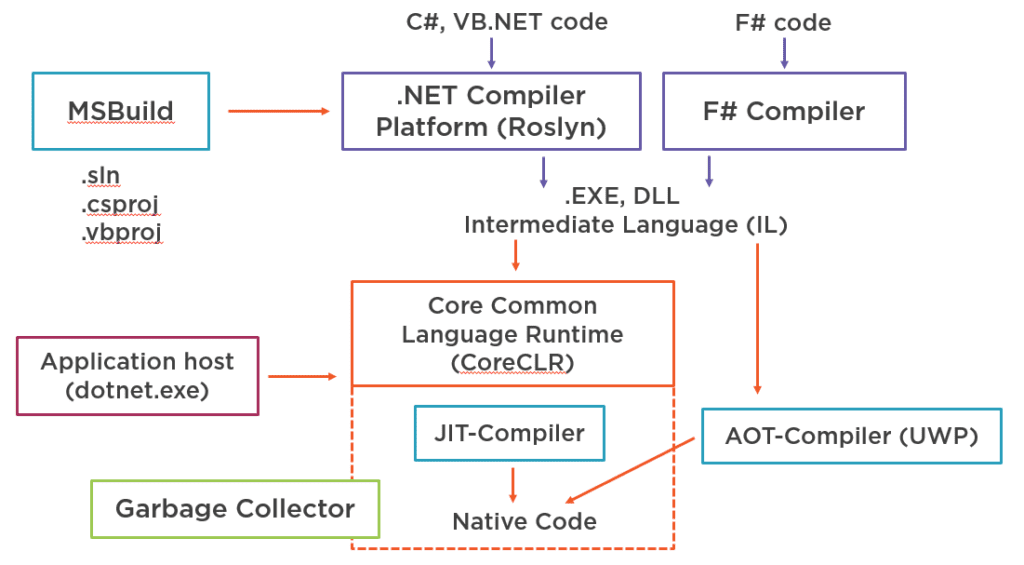
Let's trace the flow, connecting it to our three pillars:
- Source Code (C#, VB.NET): This is what you write.
- Build Tooling (MSBuild, .csproj): When you run
dotnet build, you're invoking theMSBuildengine. It reads your project file (.csproj) to understand dependencies (fromNuGet), what files to compile, and how to package them. - Compiler (.NET Compiler Platform - Roslyn): MSBuild passes your C# code to the Roslyn compiler.
- Intermediate Language (IL): The compiler doesn't produce machine code directly. Instead, it creates
.EXEor.DLLfiles containing Intermediate Language (IL). This is a platform-agnostic bytecode, similar in concept to Java bytecode. - Runtime (CoreCLR): When you run
dotnet run, the Application Host (dotnet.exe) starts the Core Common Language Runtime (CoreCLR). The CLR loads the IL. - Just-In-Time (JIT) Compiler: As the program executes, the JIT compiler within the CLR translates the IL into native machine code that is optimized for the specific CPU it's running on. This is the final step that produces the code your processor actually executes.
This diagram beautifully ties together the concepts of build tooling (MSBuild), the runtime environment (CoreCLR), and the compilation process we've discussed.
Conclusion
In this lesson, we've unpacked what makes up a language's ecosystem. You now have a framework for evaluating any new language you encounter, moving beyond syntax to the practical tools that enable development.
- Key Takeaway 1: A language's ecosystem consists of three main pillars: the Standard Library (what's built-in), the Package Manager (how to add more), and the Build Tooling (how to create the final product).
- Key Takeaway 2: Standard libraries are often designed with either a "batteries-included" philosophy (like Python and .NET) for immediate productivity, or a minimalist philosophy that relies on a strong package ecosystem.
- Key Takeaway 3: Your experience with
npmandtsc/bundlers in the Node.js/TypeScript world provides a direct analogy for understanding tools likepipin Python andNuGet/dotnetCLI in C#. They solve the same fundamental problems.
By asking "What's built-in?", "How do I add more tools?", and "How do I build and run?", you can quickly map out the landscape of any new language and start being productive.
In our next lesson, we'll build on this by exploring how to identify idiomatic code in an unfamiliar language. Now that you understand the tools and building blocks, the next step is to learn the conventional ways to put them together, just as a professional craftsperson would.