Hello! Welcome to your first lesson in the "Master network security fundamentals" course. Given your interest in cybersecurity, building a solid foundation in how networks operate is the perfect place to start. Before you can secure a network, you must first understand how devices on that network communicate with each other.
Today's lesson addresses the first learning outcome: explaining the roles of IP addresses, MAC addresses, and routers in enabling network connectivity. We'll start by defining what IP and MAC addresses are and why we need both. Then, we will explore the crucial role of the router as the "traffic director" of a network. Finally, we'll see how these three components work together to guide data from your device all the way to a server on the internet.
1. The Two Addresses: Local vs. Global
Every device on a network, from your smartphone to a massive web server, needs a unique identifier to send and receive data. In computer networking, devices actually use two kinds of addresses to manage this communication: a MAC address and an IP address. They serve different purposes but work in tandem.
Let's begin with a short video that provides a clear, high-level overview of the distinction between these two types of addresses.
MAC Address vs. IP Address: What's the Difference? Updated for 2024
This video, "MAC Address vs. IP Address," from the Eye on Tech channel, clearly explains the primary difference between these two identifiers.
Please watch the first part of the video, from the beginning up to the 1:21 mark. As you watch, focus on the analogy used to differentiate the two: one is like a local library card, and the other is like a passport.
As the video explained, the key difference lies in the scope:
- MAC (Media Access Control) Address: Used for identification on a local network. Think of it as your device's permanent, physical fingerprint.
- IP (Internet Protocol) Address: Used for identification on the global internet. This is a logical, temporary address that's more like your current postal address.
To solidify these definitions, let's turn to a short reading.
Networking Basics: How IP and MAC Addresses Work
This article from CBT Nuggets provides concise definitions for both MAC and IP addresses.
Please read the two short sections titled What is a MAC Address? and What is an IP Address?. Pay attention to who assigns each address and whether it is static (unchanging) or dynamic (changeable).
The reading confirms that the MAC address is a permanent (static) identifier burned into the hardware by the manufacturer, while the IP address is typically assigned dynamically by the network you are connected to and can change.
This handy image provides an excellent summary of the key distinctions we've just covered.

2. The Router: Your Network's Gateway
Now that we understand the two types of addresses, a question arises: how does data get from one network to another? If your computer on your home network wants to connect to a website hosted on a server in another country, how does it find its way? This is where the router comes in.
A router is a device that connects different networks. It acts as a dispatcher, forwarding data packets between these networks to ensure they reach their final destination. It is the gateway from your local network to the vastness of the internet.
To get an intuitive feel for what a router does, let's watch a few clips from this very engaging video.
what is an IP Address? // You SUCK at Subnetting // EP 1
This video from the popular tech channel NetworkChuck uses some great analogies to explain the roles of a router.
First, watch the segment from 3:50 to 4:22, which humorously explains the router's role in assigning IP addresses to devices on your local network using a service called DHCP. Then, watch the section from 9:53 to 11:03, which explains the router's second key role as the "default gateway"—the device your computer uses to send information to any address outside of its local neighborhood.
As the video illustrates, the router plays two critical parts:
- It manages the local network: It assigns local IP addresses to all connected devices, so they can talk to each other.
- It acts as a gateway: When a device wants to communicate with something outside the local network (like fetching a website), it sends the data to the router (the default gateway), which then forwards it onto the internet.
Now, let's explore why this router-based system is necessary. Why can't we just use MAC addresses for everything?
Introduction to Routers and Routing
This article from NetworkLessons explains the technical need for routers and IP addresses in large-scale networks.
Start at the beginning and read down to the end of the section that introduces the problem of scale, ending with the sentence "Let’s look at the same example, but now we are using routers.". This part explains why using only MAC addresses isn't feasible for the internet. Next, continue reading the following section, which shows how routers solve this problem. Focus on the explanation of how routers use a routing table to efficiently forward traffic without needing to know about every single device in the world.
The key takeaway is scalability. There are billions of devices on the internet. It would be impossible for each device to maintain a list of every other device's MAC address. Instead, routers use the network portion of IP addresses to maintain a much smaller, more manageable "map" of the internet, forwarding packets in the general direction of their destination network.
3. Putting It All Together: The Journey of a Data Packet
We now have all the pieces: the MAC address for local delivery, the IP address for the final destination, and the router to connect networks. Let's see how they work in concert.
Think of sending a package internationally.
- The IP Address is like the full destination address written on the box (e.g., "Ms. Jane Doe, 123 Maple Street, London, UK"). This address never changes throughout the journey.
- The MAC Address is used for each individual step of the delivery. The address of the local post office that your mail carrier takes the package to is different from the address of the airport cargo bay it goes to next, and so on. At each "hop," the delivery is directed to a new, specific MAC address.
This diagram perfectly illustrates the concept.
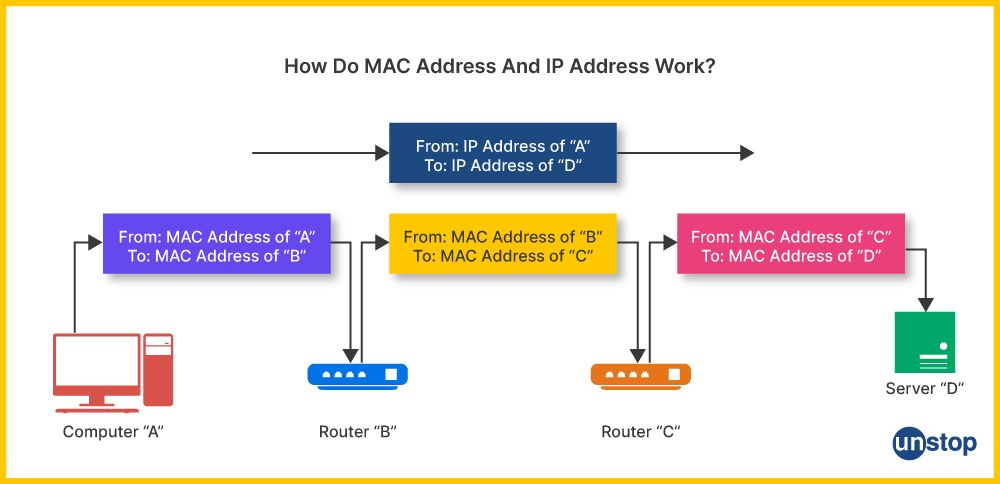
The process of looking up the MAC address that corresponds to a local IP address is handled by a mechanism called the Address Resolution Protocol (ARP). When your router needs to deliver a packet to a computer on your local network, it uses ARP to ask, "Who has this IP address?" The correct device responds with its MAC address, and the router can then complete the local delivery.
Let's read a final short section that describes this interaction, including the role of ARP.
Networking Basics: How IP and MAC Addresses Work
This section explains how all the components work together on a typical home network.
In the article, find the heading How MAC Addresses...Work Together. Read this section down to the end, just before "Final Thoughts". It provides a clear, step-by-step example of how your computer communicates with another device on your Local Area Network (LAN) using the router and an ARP broadcast.
Conclusion
In this lesson, we have unpacked the fundamental components that enable network communication. Understanding these roles is the first essential step in your journey toward mastering network security.
Here are the key takeaways:
- MAC Address: A unique, permanent hardware identifier used for devices to communicate with each other on the same local network. It operates at Layer 2 of the network model.
- IP Address: A logical, often temporary, address that identifies a device's location on a network and is used to route data across different networks (the internet). It operates at Layer 3.
- Router: A device that connects different networks. It uses a routing table and destination IP addresses to forward data packets toward their final destination, acting as a gateway between your local network and the outside world.
In our next lesson, we will build on this foundation. Now that we know how networks are connected, we will begin to explore how to secure them. We will introduce the CIA triad—Confidentiality, Integrity, and Availability—the three core principles that guide all of cybersecurity.